作者在 Server Core (WS08WebCore) 上從零建置 PHP/MySQL 部落格平台,完整記錄無 GUI 環境下的指令操作流程,展現 Core 版輕量、高效、低 TCO 優勢。
netsh (網路)、scregedit.wsf (註冊)、pkgmgr/ocsetup/oclist (角色功能)、appcmd (IIS 管理)。
ocsetup IIS-WebServerRole 安裝 IIS 7 核心角色。ocsetup IIS-CGI 支援 FastCGI。php.ini、註冊 FastCGI 處理常式)。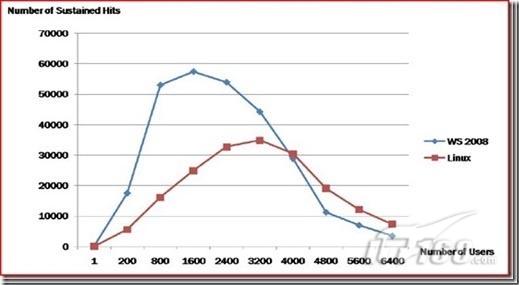
新加坡 StreetDirectory 實測:IIS 7 + FastCGI 執行 PHP 效率較原生 LAMP 環境 高出 130% (未經調校)。Core 版減少磁碟佔用、攻擊面、授權成本,大幅降低 TCO。
後續章節將逐步拆解各階段指令細節與疑難排解。
優化 Windows Server 2008 遠端桌面體驗:提高顯示優先序、禁用 Session 0、多監視器延伸、自訂解析度、暫停非必要服務
Windows Server 2008 回收站無法清空?磁碟錯誤導致,chkdsk 修復 + WinRAR 強刪 + 屬性移除完整解決
Windows Server 2008 自助安全防禦:強制啟用 DEP、限制一般使用者上網、關閉自動執行、BIOS 密碼、稽核原則
Windows Server 2008/2012 共享資料夾權限設定完整教學:原生功能與第三方工具進階管控
解決 Windows Server 2008 R2 無法安裝 SP1 或更新補丁 (錯誤 0x80070005 拒絕存取)
Hyper-V 實戰:利用差異磁碟與 Sysprep 快速部署多台 Windows Server 2008
善用命令列提升 Windows Server 2008 管理效率 (ServerManagerCmd 與 Netsh 實戰)