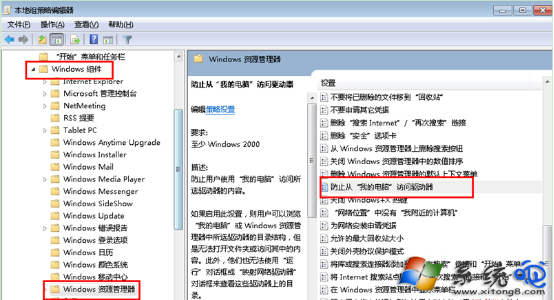
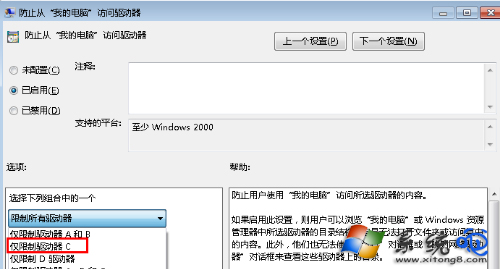
為保護系統檔案不被誤刪或破壞,可透過本機群組原則限制特定使用者存取 C 槽。
gpedit.msc
設定生效後,受限使用者在「這台電腦」中將看不到 C 槽,無法透過檔案總管存取。管理員帳號不受影響。注意:此設定不阻擋命令提示字元或其他程式直接存取 C 槽路徑。
IIS 安全設定清單:從原則制定到模組、權限、記錄、更新五大面向
Linux 修改 IP 位址圖形化工具:HttpOS 整合腳本支援 IP/閘道/DNS/主機名/密碼一鍵修改
Windows 上體驗 Chrome OS:Chrome 應用啟動器移植進展
安裝系統後開機提示「引導失敗」無法進入?USB啟動盤修復引導或進安全模式最後正確配置
電腦截圖不只 QQ!四大主流快捷截圖法大比拚:全螢幕、視窗、自訂、專業級
徹底刪除檔案不留痕:一般與特殊情況下的完整清除指南
刪除大檔案提示「太大無法放入資源回收筒」?三招解決
found.000 與 fff* 垃圾檔案來源解析:磁碟碎片整理遺留 CHK 檔、Mdm.exe 除錯暫存檔完整清除指南