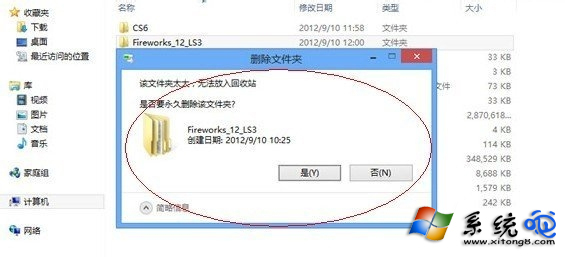
刪除大檔案時跳出「太大,無法放入資源回收筒,是否永久刪除」,三種處理方式:
確認檔案不需保留 → 點選「是」永久刪除。
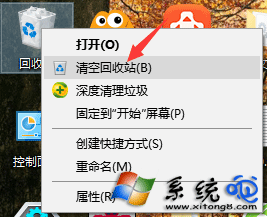
右鍵資源回收筒 → 「清空資源回收筒」騰出空間 → 再嘗試刪除。
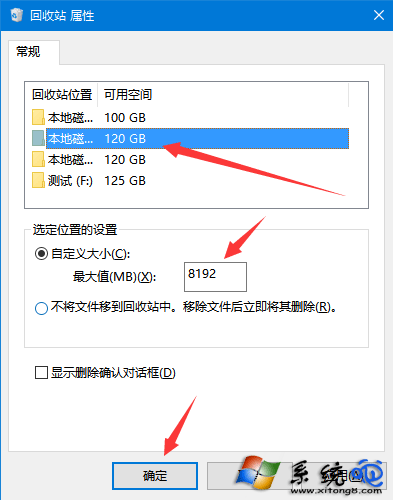
右鍵資源回收筒 → 「內容」→ 「自訂大小」→ 調大最大值(MB)→ 確定。
每顆磁碟容量獨立設定,建議預留 10-15% 磁碟空間。
開機必按 F2 才能進系統?BIOS 還原出廠值一招解決
電腦開機進入開機選單無法使用鍵盤上下鍵怎麼解決?啟用 USB 鍵盤支援
列印機掃描文件到電腦?Windows內建「傳真與掃描」免驅動免軟體操作教學
CPU 超頻發展史與實戰原理:從 486 統一主頻到倍頻鎖定、外頻調整與 PCI/AGP 分頻保護
IE8 越用越慢?8 招極速優化讓瀏覽器重獲新生
安裝驅動提示「資料錯誤」?硬碟壞軌是主因,HD Tune 掃描 + 磁碟檢查修復雙管齊下
Windows CMD 環境變數查看、修改、刪除、新增全攻略
Windows 防火牆設定完整圖解:XP / Win7 / Win8 三代系統