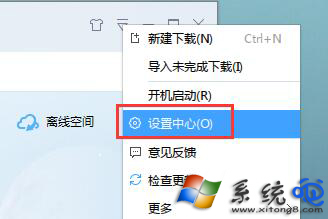
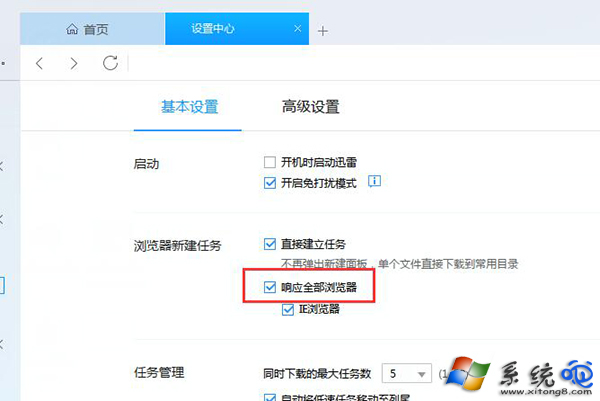
迅雷安裝後預設為預設下載工具,若點擊下載連結無反應,請檢查設定:
同理,若想取消預設,取消勾選即可。
中毒殺毒軟體開不了?進安全模式或帶網路安全模式強力掃毒
⚠ 兩步激活 Windows?小心惡意軟體與法律風險
DEP (資料執行防護) 四種運作模式完整解析與設定指引
C++ 實作 Windows 自動登入功能:修改登錄檔實現免密碼開機
Windows 字型安裝與移除完整教學:標準字型重裝、新字型加入、徹底刪除三大情境
安裝系統提示「目標卷無法被鎖定」?關閉佔用程式或進PE格式化分區解決
XP 退役後誰主沉浮?Win8.1 vs Ubuntu 13.10 硬體需求與遷移成本深度對比
一鍵清除註冊表內 Windows 產品金鑰:slmgr /cpky 保護正版授權不外洩