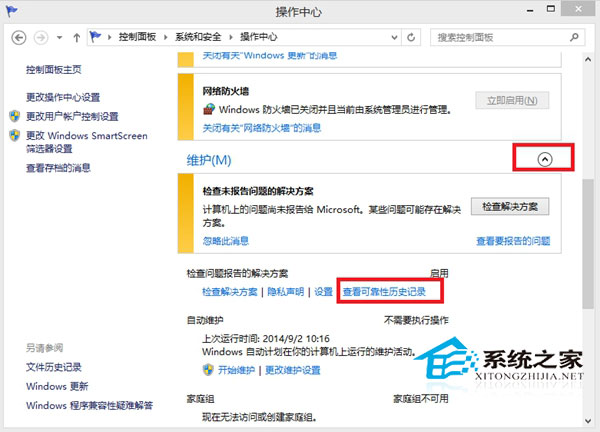
Win8.1 保留可靠性監視器記錄系統穩定性評分,功能無法關閉,僅能清除歷程記錄。
清除步驟:
此功能自 Vista 起引入,一般用戶無需過度關注,介意者可定期清除。
Win10 預覽版 14257 新增功能匯總:本次以修復為主,無新功能加入
Win8 圖片庫新增照片教學:透過庫屬性輕鬆納入自訂資料夾
Windows 10 專業版中國區售價 1,799 元,切換系統區域至美國可省 550 元(驗證圖文)
Win10/8.1 ESD 映像檔完整使用指南:解密、查看資訊、轉換安裝
騰訊電腦管家暫停 Win10 升級服務:兼容性問題導致藍屏、重啟
Windows 10 關閉系統通知與應用程式提醒完整設定指南
Windows 使用 VNC Viewer 遠端連線 Linux 桌面完整教學
Win7 無法共用資料夾解決:開啟網路探索與公用資料夾共用