微軟自 Windows 8 採用 ESD 格式發布系統映像,壓縮率優於 WIM,但多為加密檔案,需先解密才能進一步操作。本文整理從解密到安裝的完整流程。
使用 ESD Decrypter v4c 中文版,將 ESD 放入工具目錄,以管理員權限執行 decrypt_CHN.cmd 選擇模式 2(解密轉 WIM)或 4(解密轉 WIM 並打包 ISO)。
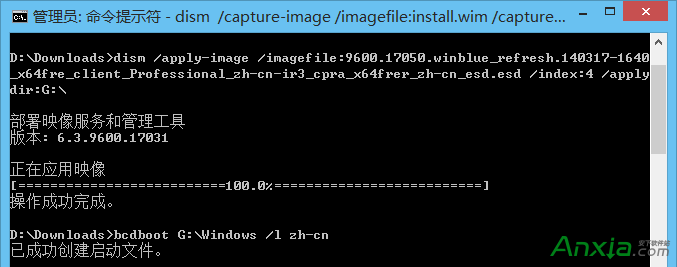
Windows 8.1 Update 版本內建的 DISM(或安裝 ADK 取得新版)支援 Get-WimInfo 讀取 ESD:
dism /Get-WimInfo /WimFile:D:\downloads\install.esd
輸出會列出所有索引(Index)對應的版本,例如:
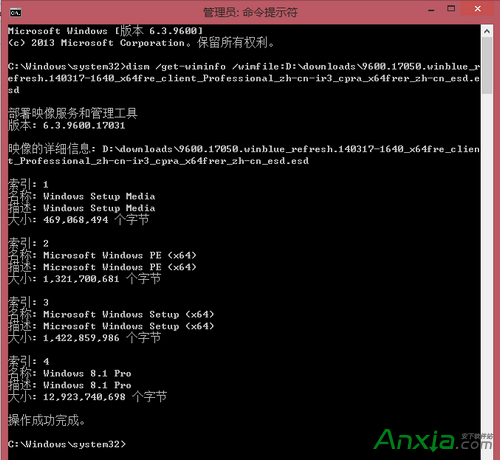
Apply-Image 部署到硬碟分區。sources\install.wim,用軟碟通等工具重新封裝成可開機 ISO。提醒:ESD 解密後體積會明顯增大,請預留足夠磁碟空間。
Win10 開機圖示巨大、字體模糊與解析度不符?調整文字大小 100% 並註銷,或重置電腦徹底解決
Win7 升級 Win10 失敗代碼 0x8007002C-0x4000D?取消「保留個人應用程式」選項重試
Windows Server 2003 版本差異完整解析:Web、標準、企業、資料中心版與 SP1/SP2/R2 新功能
Win7 系統「我的電腦」顯示攝影機圖示?安裝輕量級「Win7 攝影機」小工具即可
Win10 預覽版 10159 緊急推送:300+ Bug 修復 + 全新 Hero 壁紙
一鍵恢復 Win8/8.1 微軟拼音長句模式:開發者自製工具修復微軟移除的新體驗輸入法