Windows XP Windows 7 Windows 2003 Windows Vista Windows 綜合教學 Linux 系統教學
Windows 10 Windows 8 Windows 2008 Windows NT Windows Server 電腦軟體教學
您现在的位置: Windows教程網 >> Windows教程 >  >> Windows 綜合教學 >> 關於 Windows

一鍵恢復 Win8/8.1 微軟拼音長句模式:開發者自製工具修復微軟移除的新體驗輸入法

編輯:關於 Windows

Win8 移除微軟拼音「新體驗模式」(長句輸入、二次確認),僅保留「簡捷模式」(詞組輸入)。長期使用長句模式的用戶極度不適。開發者逆向分析後發現,核心組件 imsctip.dll 仍存在系統中,僅被登錄表權限保護與註冊表項隱藏。自製一鍵恢復工具,自動完成:取得登錄表寫入權限 → 註冊 imsctip.dll → 恢復權限 → 重啟輸入法,讓「Microsoft Pinyin NewExperience」重現輸入法列表。
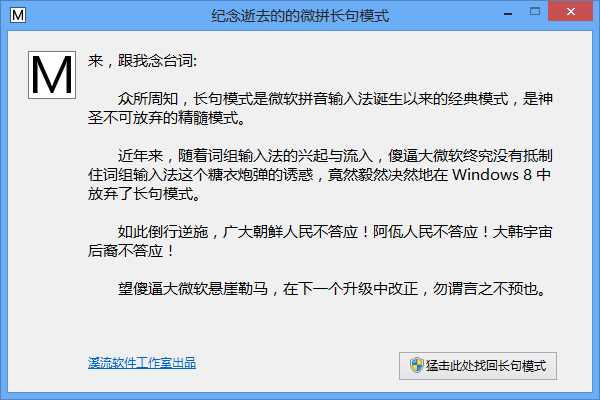
Win8.1 因核心檔案被刪除,無法直接恢復,需從 Win8 複製相關檔案並修復註冊,難度較大。工具開源供有需求者使用,呼籲微軟重視拼音長句模式用戶聲量,歸還專業輸入體驗。

Copyright © Windows教程網 All Rights Reserved