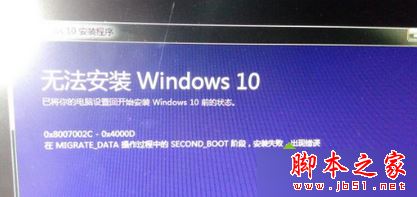
Windows 7 升級 Windows 10 過程中出現 0x8007002C-0x4000D 錯誤 (SECOND_BOOT 階段 MIGRATE_DATA 操作失敗)。經實測,取消安裝選項中的「保留個人應用程式與檔案」改為「不保留任何內容」 (乾淨安裝模式) 即可成功升級。
0x8007002C-0x4000D
說明:Win10 升級雖提供保留資料功能,但相容性不穩。排除第三方軟體干擾後仍失敗,建議直接選擇不保留資料 (或備份後乾淨安裝 ISO) 成功率最高。
Win8 找回 Metro 版 IE10 圖示:將 IE 設為預設瀏覽器即可
新電腦裝 Win10 還是 Win7?綜合優缺點分析與購機建議
Windows 10 使用破解補丁啟用隱藏通知中心功能教學
升級 Win10 14295 後滑鼠跳動、異音?禁用 TPM 維護任務暫時緩解
Win10 QQ 視訊通話攝像頭無法開啟?隱私設定開啟攝像頭權限圖文教學
Win10 家庭版免費體驗專業版功能?換個金鑰就能「試用」
Win10彈出「Windows任務的主機進程已停止工作」解決方案
Win10 會員收不到預覽版推送?UAC 設定過高導致,調整為第二級即可修復