Windows XP Windows 7 Windows 2003 Windows Vista Windows 綜合教學 Linux 系統教學
Windows 10 Windows 8 Windows 2008 Windows NT Windows Server 電腦軟體教學
您现在的位置: Windows教程網 >> Windows教程 >  >> Windows 綜合教學 >> 關於 Windows

Win10 Continuum 模式影片示範:平板/筆電無縫切換

編輯:關於 Windows

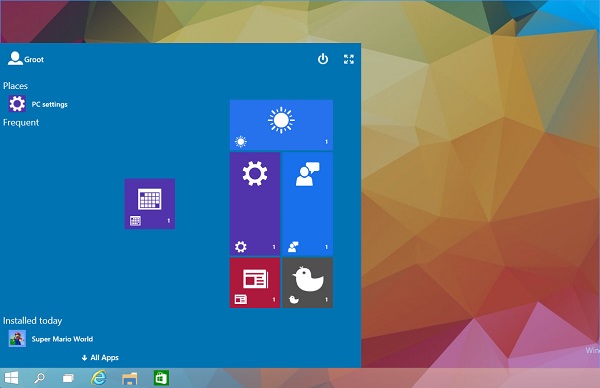
Win10 引入 Continuum 模式,消除 Metro 與傳統桌面應用隔閡,讓 Surface Pro 3 等二合一裝置體驗更佳。最新 Build 已可透過登錄表啟用體驗。
啟用步驟(需登錄表編輯):

  1. 執行 regedit,定位 HKEY_LOCAL_MACHINE\SOFTWARE\Microsoft\Windows\CurrentVersion\ImmersiveShell\Launcher。
  2. 新建 DWORD UseExperience,值設 1。
  3. 重新開機,開始畫面將呈現垂直磚區與可調整大小介面。

功能屬早期開發階段,穩定性未保證,僅供嘗鮮。不需時將值改回 0 即可還原。

Windows 10 "Continuum" 新模式示範 - 切換桌面/平板

Copyright © Windows教程網 All Rights Reserved