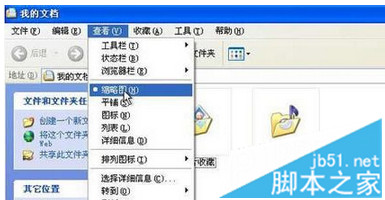
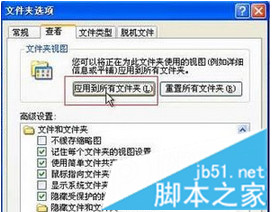
XP 預設關閉縮圖預覽。開啟任意圖片資料夾 →「檢視」→「縮圖」→「工具 → 資料夾選項 → 檢視」→ 點「套用至所有資料夾」→ 確定,關閉所有視窗重開即全域生效。
設定後無需逐個雙擊即可快速瀏覽圖片內容。
Win10 無法登出 Microsoft 帳號?重置保留檔案可強制切回本機帳號
Windows 10 寬帶連接無法記住密碼?參考 Win8.1 設定教學
Win10 價格揭曉:微軟官方公開歐美零售價,家庭版美區 119 美元、英區 99.99 英鎊、歐區 135 歐元
Win10 預覽版升級正式版詳細教學:唯有正式版光碟可升級
Windows 7 IIS 架設 FTP 伺服器完整圖文教學(旗艦版專用)
Windows 7 開機黑屏提示「Non-system disk or disk error」?主分區未啟用導致,PE 修復啟用即可解決
Win10 系統還原教學:透過系統保護回復至還原點
華碩/聯想筆記本 Win10 改 Win7 BIOS 設置全攻略:UEFI→Legacy、GPT→MBR 圖文詳解