啟用「單鍵鎖定」後,按住滑鼠左鍵片刻再鬆開,即可鎖定拖曳狀態,移動滑鼠即可拖移圖示或視窗,再次單擊左鍵釋放。適合手部不便或長時間拖曳操作。
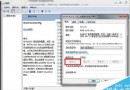
Win7 遠端桌面連線設定圖解:啟用遠端、防火牆例外一步到位
WinXP 刪除不需要的輸入法:透過控制台「文字服務與輸入語言」移除
OneKey Ghost 備份後找不到 .GHO 檔?修復磁碟錯誤 + attrib 指令找回隱藏資料夾
Windows 8 調整單一應用程式音量:音量混合器使用教學
Windows 7 假死機成因與解決對策
Win10 最需改進 10 項:檔案總管標籤、驅動更新整合、波斯曆、Aero Glass、圖標重設計、強化記事本、免費升級、任意釘選、應用獨立音訊、合併設定介面
Win7 開啟 IE 提示「已停用的增益集,網頁內容無法顯示」?兩步驟修復捷徑參數錯誤
Windows 8 將開始畫面恢復為經典開始選單模式教學