Windows 8 Release Preview 內建 Flash Player(無法解除安裝/更新)與 AMD/NVIDIA 顯卡驅動衝突,導致 IE 播放影片時顯卡驅動崩潰重置、綠屏/花屏、CPU 100%、系統死機。Chrome/Firefox 使用內建 PPAPI Flash 不受影響。
暫時緩解方案(IE 使用者)
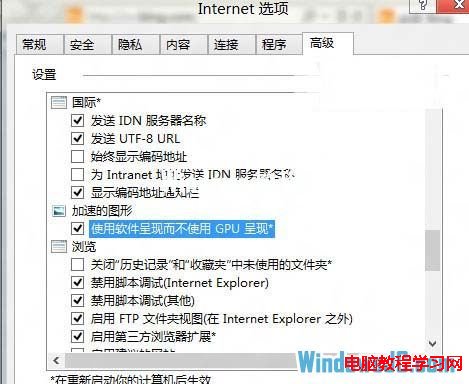
- IE 使用軟體繪製:
IE → 「工具」→「Internet 選項」→「進階」→「加速圖形」→ 勾選 「使用軟體繪製而非 GPU 繪製」 → 確定 → 重啟 IE。
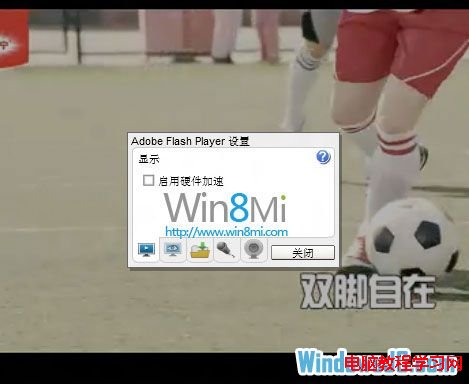
- Flash 關閉硬體加速:
任意影片網站右鍵 Flash 畫面 → 「設定」→ 取消勾選 「啟用硬體加速」 → 關閉。
根本解決:升級正式版 Windows 8 / 8.1
- RP 為預覽版,內建 Flash 版本舊且鎖死,正式版透過 Windows Update 自動更新 Flash,並修正 GPU 加速相容性。
- Windows 8.1 起改用現代應用模型,IE 11 支援 PPAPI Flash,相容性大幅改善。
- Windows 10/11 內建 Edge 瀏覽器,Flash 已於 2020 年底完全移除,歷史問題隨之終結。
替代瀏覽器策略
- 主力瀏覽器改用 Chrome/Firefox/Edge,內建沙箱 Flash/HTML5 播放器,不受系統級 Flash 影響。
- 若必須用 IE(舊版企業系統相容),建議部署 Enterprise Mode Site List 僅針對特定網站啟用 IE,其他導向現代瀏覽器。
歷史背景
Adobe Flash Player 2020/12/31 終止支援,Microsoft 透過 Windows Update (KB4577586) 移除所有支援版本 Windows 的 Flash 元件。現代 Windows 系統已無 Flash 相容性問題。