解決方法:
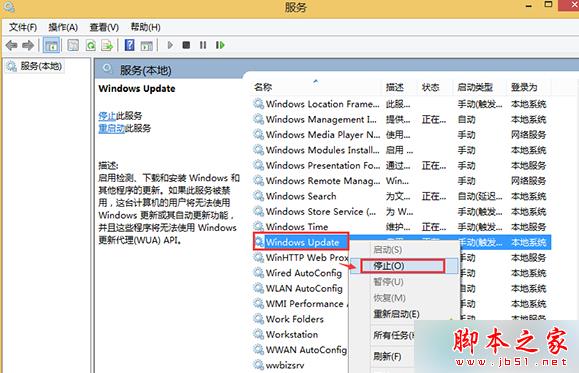
services.msc 打開。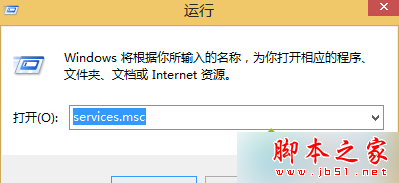
\Windows\SoftwareDistribution 中的 Download 和 DataStore 進行刪除。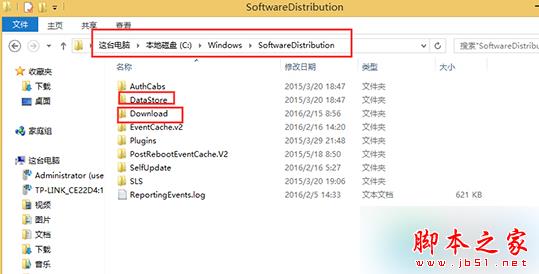
以上方法設置後,重新在應用商店下載 QQ 即可解決。
Win10 Mobile 10586.71 修復 Bug 完整匯總:強化 Wi-Fi 穩定性、優化 WP8.1 升級資料遷移、支援 SD 卡熱插拔
Win10 徹底關閉騰訊遊戲 teniodl.exe 後台下載進程:替換偽裝 exe、設定唯讀、cacls 拒絕存取權限
Windows 10 桌面顯示「此電腦」與「控制台」圖示教學
Windows 7 IE8 頻繁「已停止運作」排查思路:加載項逐一排除法
Win 10 新版加入「暫停更新 35 天」功能:Insider 專屬緩衝期
Win10 內建 Hyper-V 虛擬機啟用教學:控制台開啟 Windows 功能
Win10 Edge 瀏覽器如何重置?安全模式刪除包文件夾 + PowerShell 重裝
制作支援 UEFI 電腦的 Win10 安裝 U 盤:Rufus USB 選 GPT 分區方案、ISO 鏡像模式一鍵完成