Windows XP Windows 7 Windows 2003 Windows Vista Windows 綜合教學 Linux 系統教學
Windows 10 Windows 8 Windows 2008 Windows NT Windows Server 電腦軟體教學
您现在的位置: Windows教程網 >> Windows教程 >  >> Windows 綜合教學 >> 關於 Windows

Win10 免登出切換「開始功能表/開始畫面」:登錄表修改法

編輯:關於 Windows

Win10 預覽版預設切換開始模式需登出重新登入,影響工作連續性。透過修改登錄表可免登出即時切換(僅需重啟 explorer.exe 進程)。

操作步驟(建議先備份登錄表)

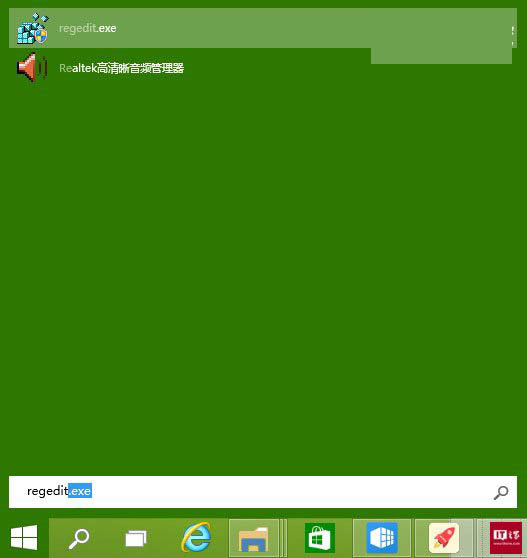
  1. 按 Win+R 輸入 regedit 開啟登錄表編輯器。
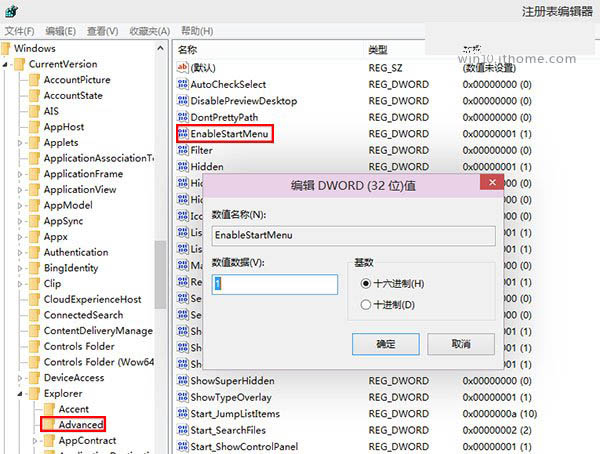
  2. 定位至:HKEY_CURRENT_USER\Software\Microsoft\Windows\CurrentVersion\Explorer\Advanced
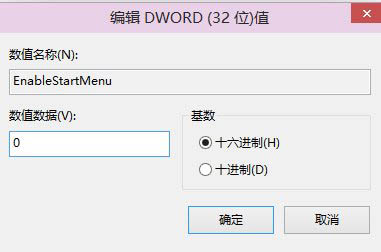
  3. 在右側找到 EnableStartMenu(DWORD 值):
     • 1 = 開始功能表模式
     • 0 = 開始畫面模式
  4. 將數值在 0 與 1 之間切換 → 確定。
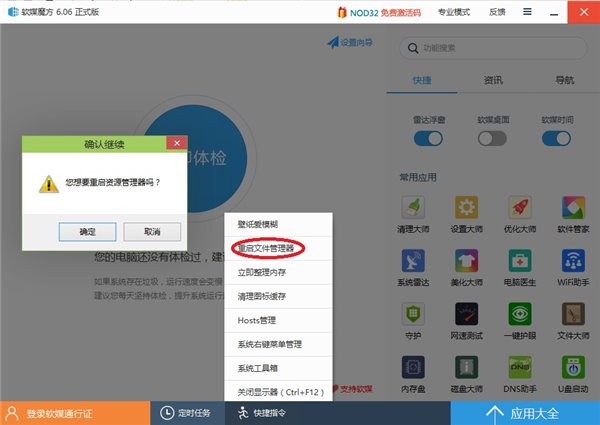
  5. 重啟 explorer.exe 進程(可用軟媒魔方等工具一鍵重啟),修改即時生效。
優缺點: 最大優點免登出,缺點是重啟 explorer.exe 會關閉所有資源管理員視窗,操作前請儲存工作。

Copyright © Windows教程網 All Rights Reserved