Windows XP Windows 7 Windows 2003 Windows Vista Windows 綜合教學 Linux 系統教學
Windows 10 Windows 8 Windows 2008 Windows NT Windows Server 電腦軟體教學
您现在的位置: Windows教程網 >> Windows教程 >  >> Windows 綜合教學 >> 關於 Windows

Windows XP 光碟機無法自動播放?群組原則/登錄檔雙重解法啟用 AutoRun

編輯:關於 Windows

XP 光碟插入無反應,多因安全軟體/優化工具關閉 AutoRun。兩法啟用:

法一:群組原則 (推薦)

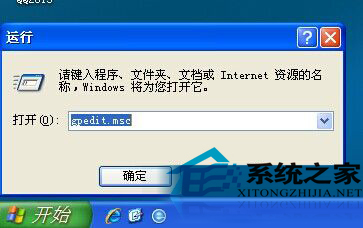
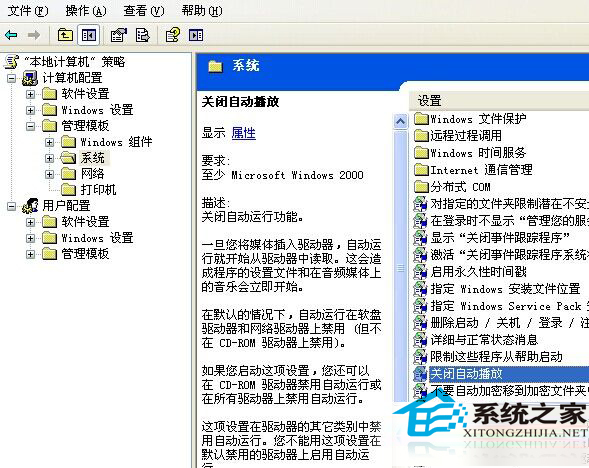
  1. gpedit.msc → 電腦設定 → 管理範本 → 系統。
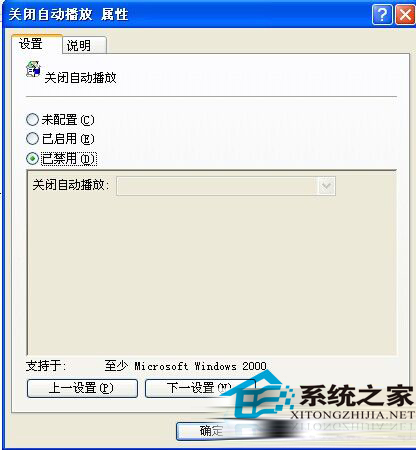
  2. 雙擊「關閉自動播放」 → 設為「已停用」或「未設定」 → 確定 → 重開機。
執行 gpedit.msc
關閉自動播放設定項
設為已停用

法二:登錄檔

  1. regedit → HKEY_CURRENT_USER\Software\Microsoft\Windows\CurrentVersion\Policies\Explorer。
  2. 修改 NoDriveTypeAutoRun 二進位值為 95 00 00 00 → 重開機。
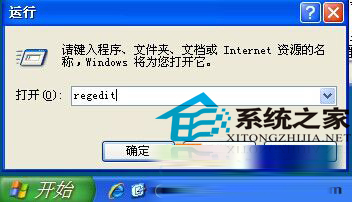
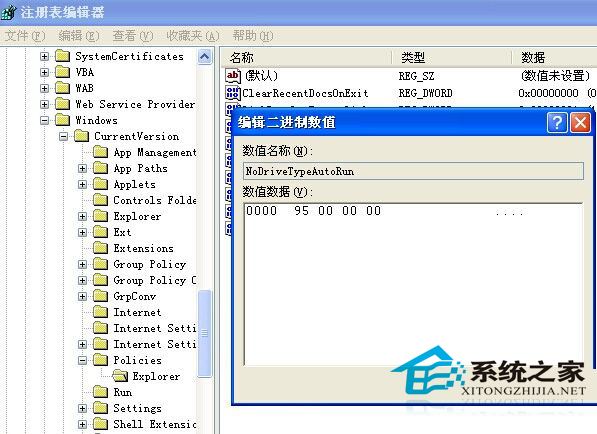
執行 regedit
修改 NoDriveTypeAutoRun 值

說明:未設定 = 系統預設開啟;已啟用可選擇僅禁用光碟或所有裝置。啟用 AutoRun 方便但增加病毒傳播風險,請權衡使用。

Copyright © Windows教程網 All Rights Reserved