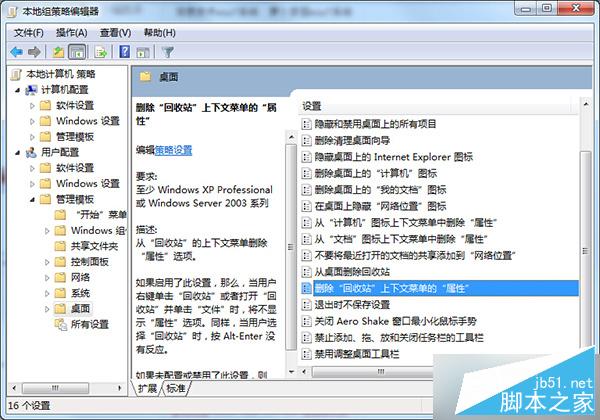
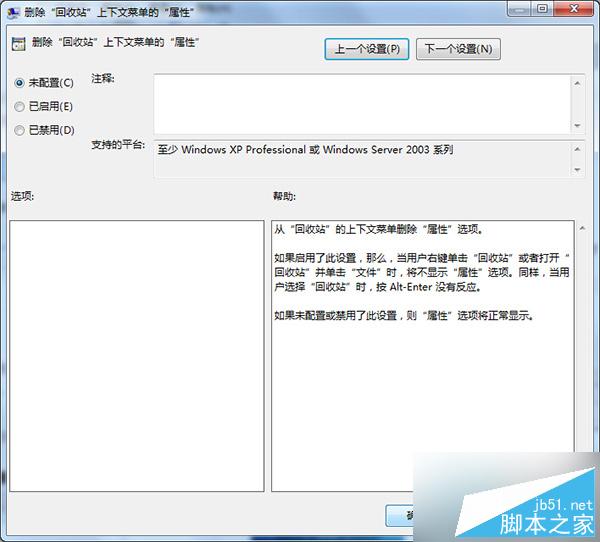
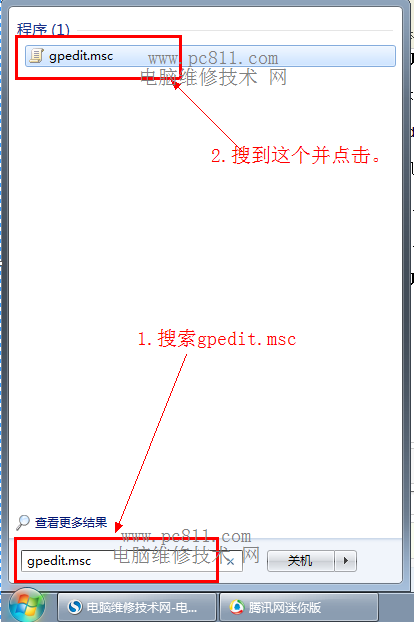
Win7 開啟資源回收筒彈出「此項目屬性未知」,透過群組原則恢復預設設定即可修復。
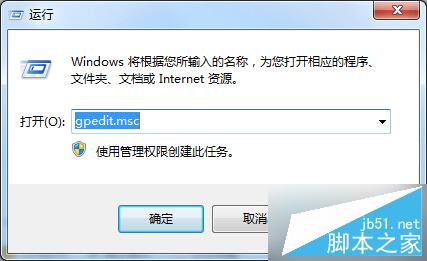
gpedit.msc
修復後資源回收筒右鍵選單恢復正常,屬性功能可正常使用。此問題通常因誤啟用該原則導致。
Windows 10 Mobile Build 10166 慢速環推送:應用商店去 Beta 化、電池圖示正常化
XP 系統如何套用 Vista 螢幕保護程式?透過複製系統檔案即可實現
Windows 10 Build 10122 數字鍵盤指示燈不亮?三種解決方案:登錄、BIOS、重啟大法
Win10 字體模糊怎麼辦?修改登錄檔與 DPI 縮放解決教學
Win10 10547 安裝體驗改進:密鑰輸入介面新增說明文字
盜版免費升級 Win10 每小時黑畫面一次?真相揭秘:微軟授權政策反覆橫跳
Win10 技術預覽版隱藏高階圖示支援 4K 螢幕:最高 768×768 解析度
Win10 桌面版 10586.218 累積更新 KB3147458:安全性修復與穩定性優化,無新功能