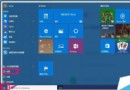
Windows 10 開始選單右側 Metro 磚多為不常用應用,逐個取消釘選繁瑣,可用 PowerShell 一鍵全數卸載:
Get-AppxPackage -AllUsers | Remove-AppxPackage
注意: 此指令會移除所有現代應用(含計算機、照片、郵件等),如需保留特定應用請改用 Get-AppxPackage *名稱* | Remove-AppxPackage 單獨移除。
Get-AppxPackage *名稱* | Remove-AppxPackage
Win10 更新報錯 0x8024402f 解決法:重置更新服務與相關 DLL 註冊 (微軟社區官方方案)
解決 Windows 7 網路識別問題:停用/啟用網路介面卡重設連線
Win10 召喚小冰刷顏值贏序列號?活動詳情與操作教學
Win10 快速切換桌面兩大法:工作列按鈕與 Win+D 快捷鍵
Windows 10 安裝卡在「已完成 18%」動不了?等待、斷網、取消重試三大對策
Windows 10 Build 10134 安裝上手操作體驗影片 (搜狐視頻)
Win10 RedStone 最新預覽版 14267 截圖曝光
Windows 10 零售版僅此一份:正式版將透過網路直接推送