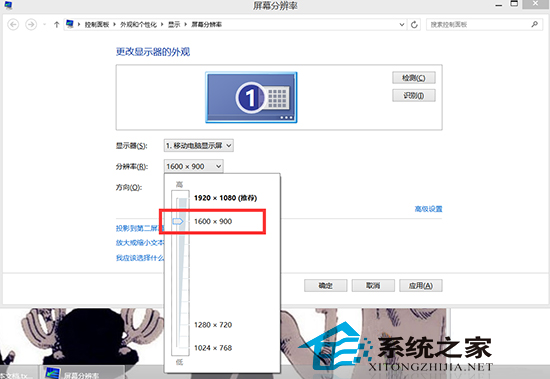
使用 QQ 遠端桌面時滑鼠點擊位置偏移,主因是雙端解析度不匹配導致座標映射偏差。解決方法極簡單:
遠端桌面將控制端畫面縮放至被控端解析度,解析度差異過大會導致像素映射誤差。降低被控端解析度可減少縮放比例,提升座標對應準確度。同理適用於 Win7 內建遠端桌面、TeamViewer 等工具。
XP 升級 Windows 8 圖文完整教學
Windows 7 清除幽靈裝置:啟用「顯示隱藏裝置」徹底移除舊驅動
Win10 Build 10049 新增 Bio Enrollment 應用:Windows Hello 生物辨識前置作業
Win7 登入顯示「您已使用臨時設定檔登入」怎麼辦?完整解決方案
微軟發布影片對比 Win10 Build 9879 與 9860 差異
Windows 桌面圖示不見了?三種情況分類解決 (Win8.1 示範)
Windows 7 如何在同一視窗開啟多個資料夾?兩大解決方案輕鬆搞定
Windows XP/7/8 顯示隱藏檔案與系統隱藏檔案:資料夾選項設定圖文教學