桌面圖示消失可分三種情況,由易到難依序排查:
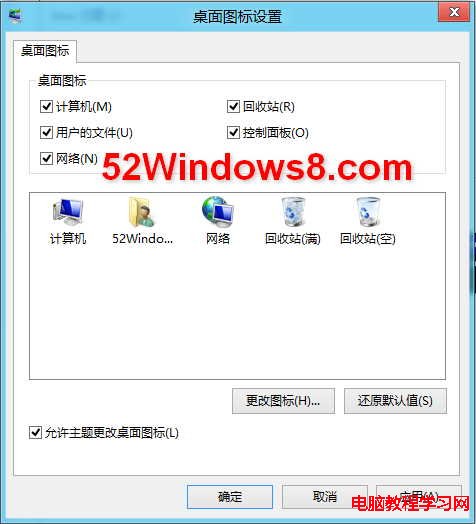
Win8.1 預設不顯示系統圖示。右鍵桌面 → 「個人化」→ 「主題」→ 「桌面圖示設定」→ 勾選需要的系統圖示 → 確定。
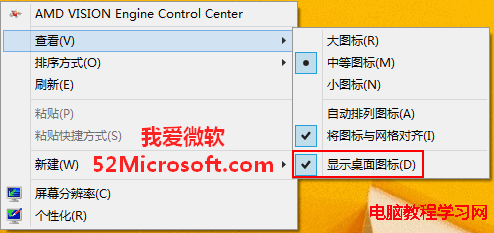
右鍵桌面空白處 → 「檢視」→ 勾選「顯示桌面圖示」。此選項被誤取消是最常見原因。
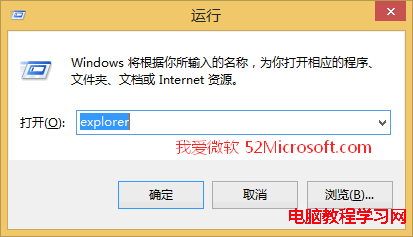
Windows 檔案總管 (explorer.exe) 崩潰未自動重啟。解法: Win + R → 輸入 explorer → Enter,手動啟動檔案總管,桌面與工作列即恢復。
explorer.exe
explorer
依序排查,多數情況在前兩步即可解決。
Win 10 系統如何查看圖片尺寸(大小)?五種方法圖文教學
Win10 RTM 升級 C 槽空間不足解決方案:支援 USB/外接硬碟暫存
Win7/Win8 安裝卡住「無法定位現有系統分區」?雙方案修復引導區、預複製開機檔案
Win7 防火牆錯誤 0x8007437 無法更改設定?四大解決方案完整攻略
Windows 10 確認原生支援 8K 解析度,螢幕需 27 吋以上
Win 10 打不開 Excel 提示「向程式傳送命令時出現問題」解決法:關閉 DDE
DirectX 12 現場實測:同樣硬體效能暴增 50%,功耗大幅降低
Windows 10 透過群組原則禁止 USB 隨身碟/可移動裝置連接教學