Windows XP Windows 7 Windows 2003 Windows Vista Windows 綜合教學 Linux 系統教學
Windows 10 Windows 8 Windows 2008 Windows NT Windows Server 電腦軟體教學
您现在的位置: Windows教程網 >> Windows教程 >  >> Windows 綜合教學 >> 關於 Windows

Windows XP/7/8 顯示隱藏檔案與系統隱藏檔案:資料夾選項設定圖文教學

編輯:關於 Windows

Windows 預設隱藏系統保護檔案,需修改資料夾選項才能看見。

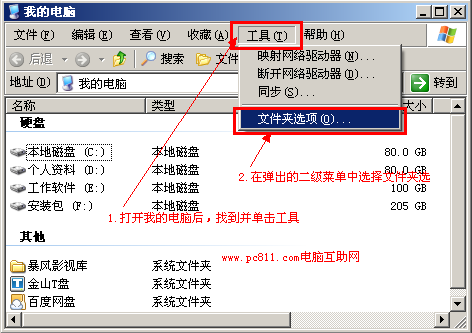
Windows XP

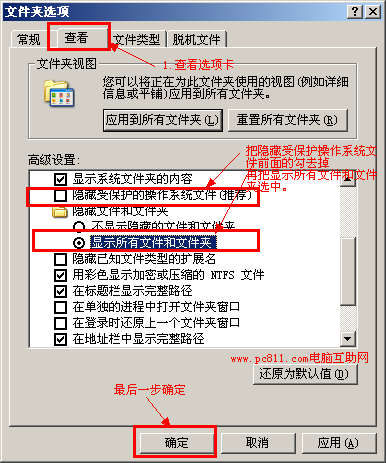
  1. 「我的電腦」→「工具」→「資料夾選項」→「檢視」。
  2. 取消勾選「隱藏受保護的作業系統檔案」→ 選「顯示所有檔案和資料夾」→ 確定。
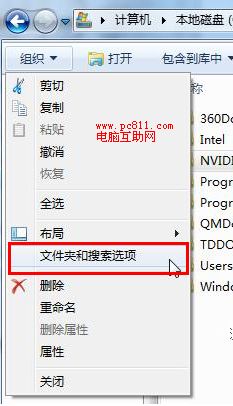
Windows 7

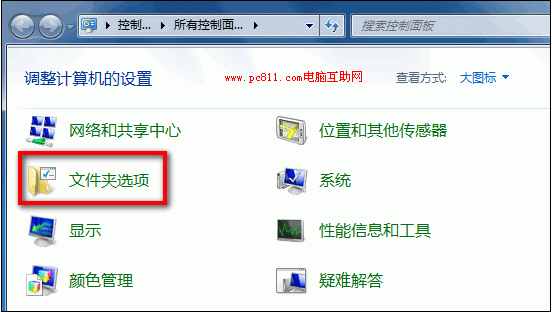
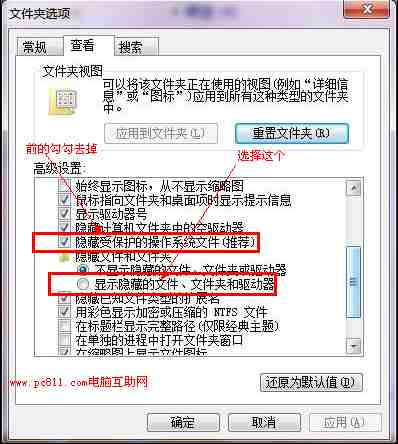
  1. 「電腦」→「編排」→「資料夾和搜尋選項」→「檢視」。
  2. 取消「隱藏受保護的作業系統檔案」→ 選「顯示隱藏的檔案、資料夾和磁碟機」→ 確定。
Windows 8

  1. 「電腦」→「檢視」索引標籤 → 勾選「隱藏的項目」。

設定後系統碟將顯示大量隱藏/系統檔案,操作謹慎避免誤刪關鍵檔案。

Copyright © Windows教程網 All Rights Reserved