Windows XP Windows 7 Windows 2003 Windows Vista Windows 綜合教學 Linux 系統教學
Windows 10 Windows 8 Windows 2008 Windows NT Windows Server 電腦軟體教學
您现在的位置: Windows教程網 >> Windows教程 >  >> Windows 綜合教學 >> 關於 Windows

Win7 開機黑屏只有滑鼠?三大解法:強制重開、休眠喚醒、工作管理員重啟 explorer + 修復登錄 Shell 值

編輯:關於 Windows

Win7 開機進入黑屏僅剩滑鼠游標,提供三種解決方案,由簡入繁。

方法一:強制關機重開 (最簡單)

長按電源鍵強制關機,再開機,多數情況可自動修復。

方法二:休眠喚醒法 (偶爾有效)

黑屏時短按電源鍵進入休眠 (螢幕變黑),再按一次電源鍵喚醒,嘗試恢復桌面。

方法三:工作管理員重啟 explorer + 修復登錄 (根治)

  1. Ctrl+Alt+Del → 「工作管理員」 → 「檔案」 → 「新增工作」 → 輸入 explorer → 確定,桌面即恢復。
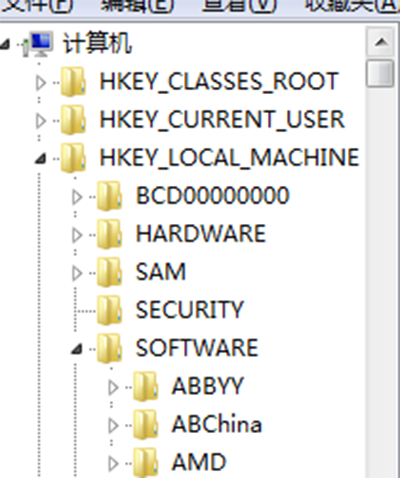
  2. Win + R → regedit → 瀏覽至 HKEY_LOCAL_MACHINE\SOFTWARE\Microsoft\Windows NT\CurrentVersion\Winlogon。
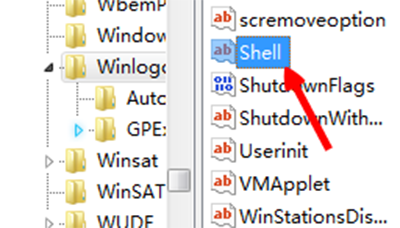
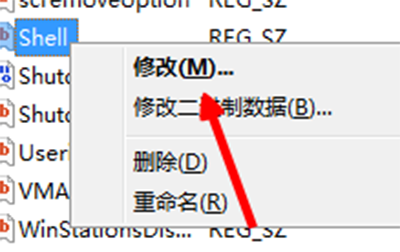
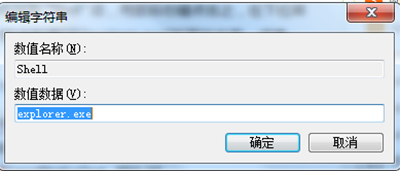
  3. 右側找 Shell → 右鍵修改 → 清空數值資料 → 確定 → 重開機。

原理

Shell 值被惡意軟體/優化工具篡改導致 explorer 無法正常啟動。清空後系統會使用預設值 explorer.exe。

Copyright © Windows教程網 All Rights Reserved