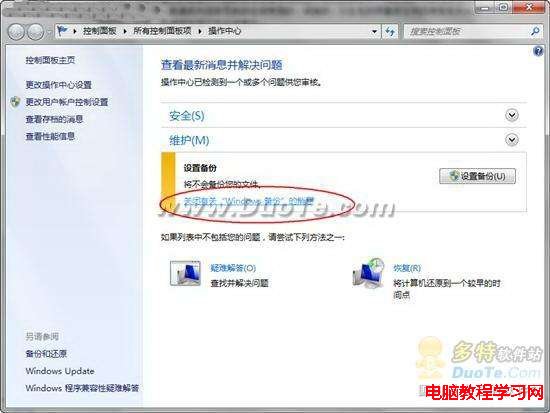
Windows 7 任務列右下角旗幟圖示點擊後會出現「設定備份」通知,若不需要此功能,可透過「動作中心」快速關閉。
未來若需重新啟用,同樣路徑點擊「開啟訊息」即可恢復提示。
Win7 無法更改螢幕保護程式?群組原則「禁止變更螢幕保護程式」設為未配置/已停用
Windows 7 如何優化音樂播放效果?內建「消除人聲/變調/環境/均衡器」打造居家 KTV 體驗
Win7 開機黑屏只剩滑鼠?重啟 explorer.exe 與修復登錄檔徹底解決
Win9 採全新測試與更新機制:即時遙測系統 Asimov 加速迭代
Win10 螢幕飽和度/色彩調整:個人化 > 色彩 > 關閉自動主題色 > 手動選色
Win8 Foxmail 寄信提示「收件密碼錯誤」?檢查伺服器域名或重建帳號模板即可
Windows 8.1 如何快速關閉家庭組功能
Win7 家庭進階版找不到 secpol.msc (本地安全性原則) 怎麼辦?