為防隱私洩露隱藏 USB 設備:
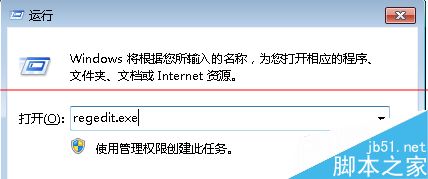
regedit.exe
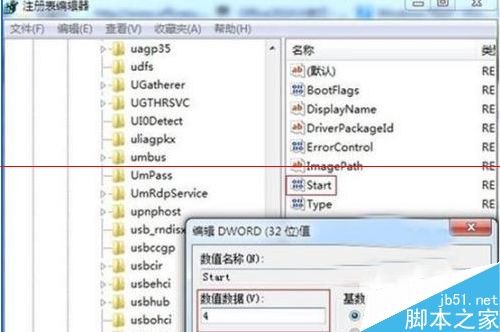
HKEY_LOCAL_MACHINE\SYSTEM\CurrentControlSet\services\USBSTOR
Start
3
4
簡單有效保護隱私。
升級 Windows 10 正式版必看:相容性檢查、軟體重裝提醒、預約流程完整圖解
Windows 10 正式版尚未完成,微軟:請等待
解決 Windows 10 Build 9926 開始選單與通知中心無法開啟的問題
Win8 首次開機黑屏硬碟燈不亮?關閉「快速啟動」即可解決
Win10 萬不可安裝 KB3132372 補丁!導致瀏覽器崩潰、卡死、空白嚴重問題
深入解析 KMS 激活:原理、風險與正版授權的必要性
Win10 系統版本號怎麼看?兩種快速查看建置版本方法
Windows 8 關閉自動播放完整教學:控制台與群組原則雙重防護