Win8 內建微軟輸入法使用聊天軟體時頻繁彈出「文字轉換錯誤」提醒,關閉法:
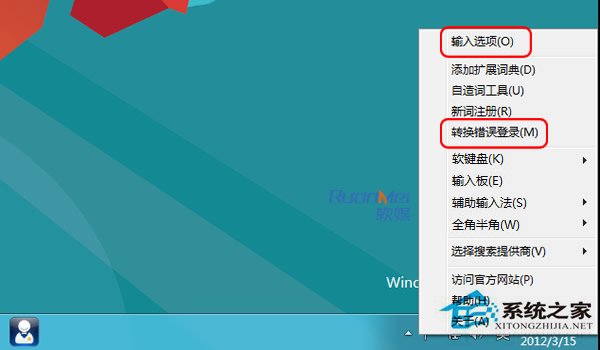
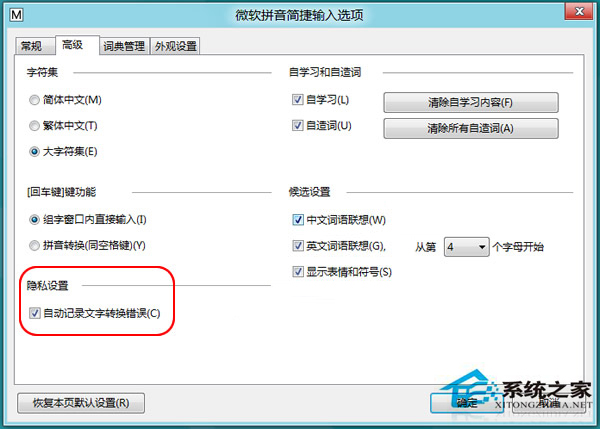
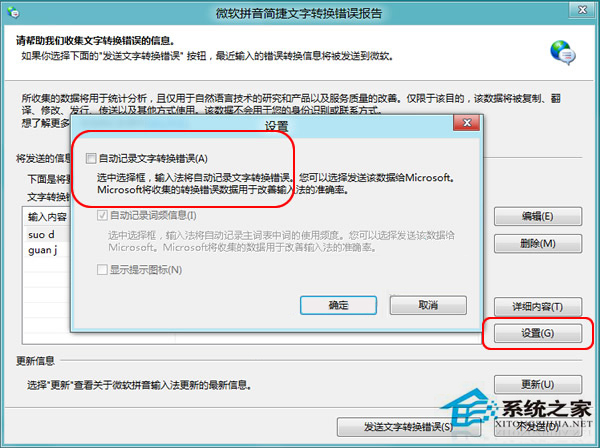
設定後聊天不再被錯誤提醒打擾,輸入法識別率與詞庫不受影響。
Win10 連接手機熱點藍屏 KERNEL_SECURITY_CHECK_FAILURE?停用無線網卡 802.11n 模式即可解決
Win7 釋放 C 槽空間 12 招:關閉系統還原/休眠、移動虛擬記憶體/文件庫、清理快取/日誌/更新暫存檔
Win10 資料夾顯示圖片詳細屬性(解析度、拍攝時間等)完整教學
Win7 自訂「執行」指令快速啟動程式:定義數字熱鍵對應常用應用
Win7 開機黑屏只剩滑鼠?重啟 explorer.exe 與修復登錄檔徹底解決
Windows Server 2008 資料安全完整解析:加密、NTFS、BitLocker 與 TDE