Windows 7登入時若在C:\Users下出現TEMP暫存設定檔資料夾,表示使用者設定檔關聯損毀。系統會備份原註冊表鍵值(加.bak尾綴)並建立新鍵值指向暫存資料夾。請依下列步驟修復:
C:\Users\用戶名),再刪除該資料夾。regedit),瀏覽至:HKEY_LOCAL_MACHINE\SOFTWARE\Microsoft\Windows NT\CurrentVersion\ProfileListProfileImagePath指向原設定檔資料夾且鍵值名以.bak結尾的項目,刪除它。ProfileImagePath為C:\Users\TEMP的項目,刪除它。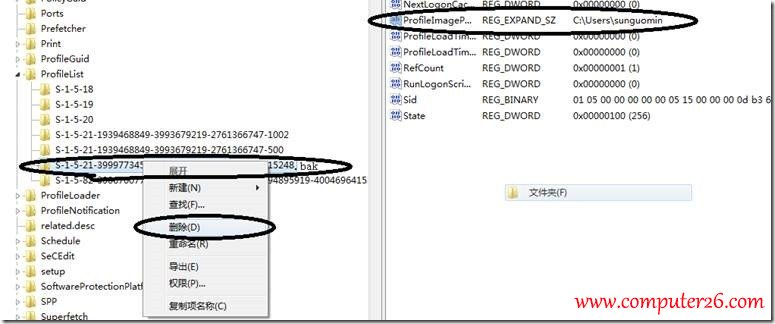
Windows XP 設定 PPTP/L2TP VPN 連線完整圖文教學
Windows 10 RTM 正式版確定 7 月發布,7 月 22 日簽署完成
Windows 7 設定自動關機:工作排程器與 shutdown 指令
Win10 10022 版 Task View 介面優化:新增桌面按鈕與透明化底欄
Win10 任務列通知區域隱藏圖示三角按鈕開關:自訂通知區域一鍵切換
Win7 蓝屏 Win32k.sys 错误排查:安全模式验证 → 干净启动定位第三方冲突 → 回溯近期变更 → sfc/scannow 修复系统文件