Windows XP Windows 7 Windows 2003 Windows Vista Windows 綜合教學 Linux 系統教學
Windows 10 Windows 8 Windows 2008 Windows NT Windows Server 電腦軟體教學
您现在的位置: Windows教程網 >> Windows教程 >  >> Windows 綜合教學 >> 關於 Windows

Windows 7 IE 設定預設首頁:指定開啟指定網站

編輯:關於 Windows

想讓 IE 啟動時直接開啟常用網站(如公司入口、新聞、搜尋引擎),透過 Internet 選項「一般」索引標籤即可設定單一或多個首頁索引標籤。

操作步驟

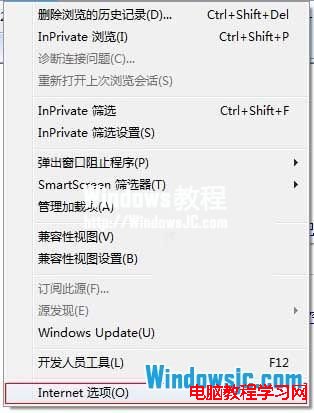
  1. 開啟 IE → 「工具」(齒輪圖示) → 「Internet 選項」。
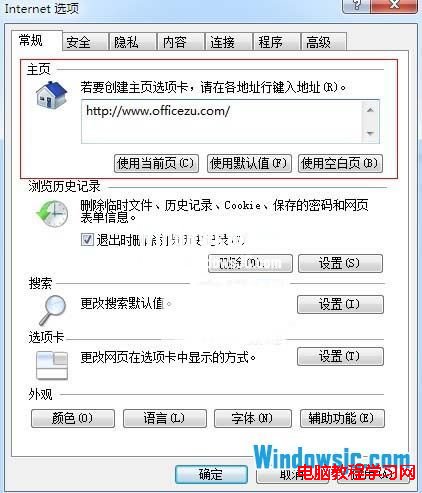
  2. 「一般」索引標籤 → 「首頁」區域,在輸入框輸入網址(如 https://www.example.com)。
  3. 若需多首頁,每行一個網址,IE 啟動時會同時開啟多個索引標籤。
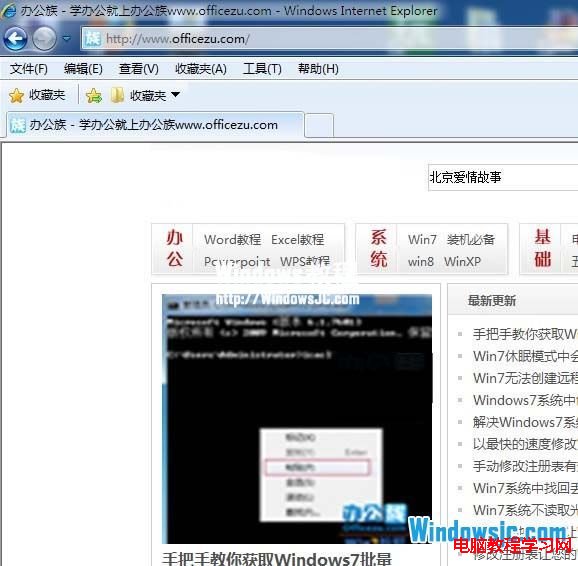
  4. 按「套用」→「確定」,重新啟動 IE 驗證。

IE 工具 Internet 選項

首頁輸入框設定網址

啟動 IE 自動開啟首頁

進階技巧

  • 使用 about:blank 設為空白頁,啟動最快、最省資源。
  • 企業環境:群組原則 使用者設定 → 系統管理範本 → Windows 元件 → Internet Explorer → 設定首頁 強制指定並鎖定(使用者無法修改)。
  • 惡意軟體修改首頁:若首頁被鎖定無法修改,執行 sfc /scannow、掃毒、檢查註冊表 HKCU\Software\Microsoft\Internet Explorer\Main\Start Page 是否被寫保護。


Copyright © Windows教程網 All Rights Reserved