升級 Win10 後發現資料夾不再像 Win7 顯示圖片詳細資訊?只需幾步即可找回。
操作方法:
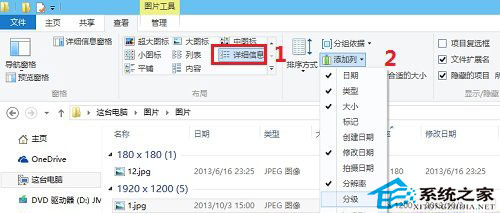
Win10 提供豐富的圖片中繼資料欄位,依需求啟用即可。
最新 Build 10240 截圖首曝:註冊表暗示即為正式版,ADK 已建立新 Windows PE 環境
Win8.1 安裝 CAD2006/2008 激活時「停止運作」?卸載 KB2962872 更新即可解決
Win10 正式版 10586.122 更新內容完整匯總:全方位可靠性穩定性提升
Win8 內建 Windows Defender 阻擋修改 hosts 檔案?加入排除清單即可解決
微软发布邀请函:Win10 第二次发布会 1 月 21 日举行,主题 "the next chapter" 聚焦消费者功能