Windows XP Windows 7 Windows 2003 Windows Vista Windows 綜合教學 Linux 系統教學
Windows 10 Windows 8 Windows 2008 Windows NT Windows Server 電腦軟體教學
您现在的位置: Windows教程網 >> Windows教程 >  >> Windows 綜合教學 >> 關於 Windows

Windows 10 匯入 12306 證書導致瀏覽器當機?啟用 HDZB 服務即可解決

編輯:關於 Windows

常在 12306 購票的用戶知須安裝證書,但部分用戶升級 Win10 後,在瀏覽器匯入備份證書時出現瀏覽器卡死、匯入失敗。解決方法如下:
解決步驟

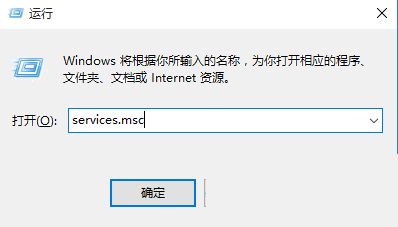
  1. 按 Win+R 開啟「執行」→ 輸入 services.msc 開啟服務管理員。
  2. 尋找「HDZB Comm Service 64 For V2.0」(32 位元系統則無「64」字樣)。
  3. 雙擊開啟該服務 → 將「啟動類型」設為「自動」 → 點選「啟動」按鈕。
  4. 重新開啟瀏覽器匯入「12306 網站證書」即可順利完成。

此法可解決 Win10 匯入 12306 證書時瀏覽器卡死問題。

Copyright © Windows教程網 All Rights Reserved