Windows XP Windows 7 Windows 2003 Windows Vista Windows 綜合教學 Linux 系統教學
Windows 10 Windows 8 Windows 2008 Windows NT Windows Server 電腦軟體教學
您现在的位置: Windows教程網 >> Windows教程 >  >> Windows 綜合教學 >> 關於 Windows

Win7 批次安裝字體:複製字體檔至 C:\Windows\Fonts 一鍵完成

編輯:關於 Windows

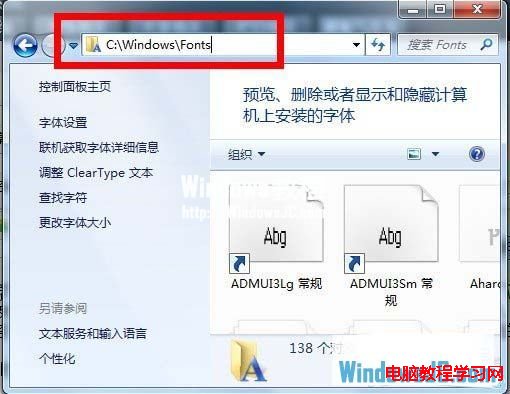
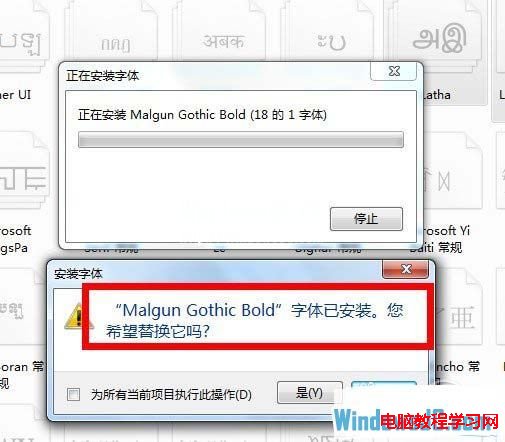
Win7 批次安裝字體極簡單:開啟 C:\Windows\Fonts → 將多個 .ttf/.otf 檔案一次複製貼上 → 系統自動安裝,遇重複字體可選「略過」或「覆蓋」。

操作步驟

  1. 開啟 C:\Windows\Fonts(或控制台 →「字型」)。
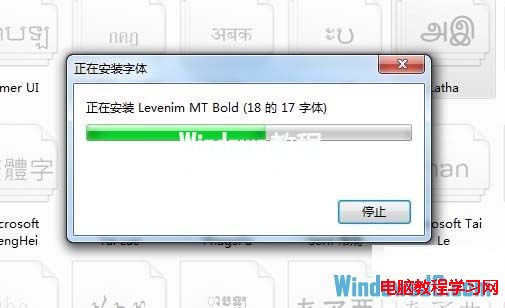
  2. 選取多個字體檔 → Ctrl+C → Ctrl+V 貼上至 Fonts 資料夾。
  3. 彈出安裝對話框 → 重複字體選「略過」或「覆蓋」 → 等待完成。

注意事項

  • 需系統管理員權限(預設即有)。
  • 大量字體(超過 500-1000)可能拖慢啟動/程式開啟字體選單速度,建議僅安裝常用字體。

Copyright © Windows教程網 All Rights Reserved