錯誤現象
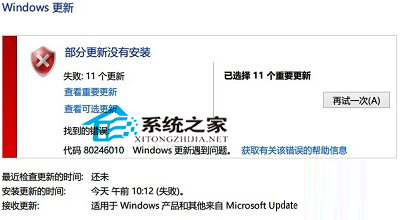
Windows Update 執行更新時失敗,彈出錯誤代碼 80246010 (WU_E_WU_DISABLED / 服務被禁用/存取被拒絕相關),常見於更新服務衝突、網路不穩、系統檔案損壞情境。
四大建議解決策略
建議一:錯開防毒軟體與系統更新時間
- 防毒軟體 (含 Windows Defender/MSE) 更新病毒碼時會鎖定檔案/註冊表,與 Windows Update 同時執行極易衝突。
- **操作**:先手動更新防毒軟體 → 完成後再執行 Windows Update。或在防毒軟體獨立介面更新病毒碼,勿依賴 Windows Update 推送定義更新。
建議二:離線下載更新套件手動安裝
- 前往 Microsoft Update Catalog 搜尋 KB 編號下載 .msu/.cab 檔案。
- 以系統管理員身分執行:
wusa KBxxxxxx.msu /quiet /norestart。
- 參考:《Windows 8 如何自訂更新部分補丁》。
建議三:避開網路尖峰時段更新
- 晚間 20:00-23:00、週末為全球 Windows Update 下載高峰,伺服器頻寬擁擠導致連線逾時/中斷。
- **建議時段**:平日午休 (12:00-13:30)、凌晨 (02:00-05:00)、上班前 (07:00-08:30)。
建議四:拒絕「系統精簡/優化」版映像
- 網路上流通的 Ghost/ISO 精簡版常移除 Windows Update 相關元件 (wuauserv、TrustedInstaller、元件存放區)、刪除註冊表鍵值、停用關鍵服務。
- **後果**:更新失敗、元件存放區損壞 (0x800f081f)、動態連結庫遺失、功能異常。
- **根治**:重新安裝 **原版零售版/官方 ISO** Windows 8.1,勿使用第三方精簡映像。
通用除錯步驟
- Win + R →
services.msc → 確認 Windows Update (wuauserv)、背景智慧型傳送服務 (BITS)、加密服務 均為「自動」且「執行中」。
- 命令提示字元 (系統管理員) 執行:
sfc /scannow (系統檔案修復)
Dism /Online /Cleanup-Image /RestoreHealth (元件存放區修復,Win8+)
- 重置 Windows Update 元件:
net stop wuauserv & net stop bits & ren %systemroot%\SoftwareDistribution SoftwareDistribution.old & net start wuauserv & net start bits