Windows XP Windows 7 Windows 2003 Windows Vista Windows 綜合教學 Linux 系統教學
Windows 10 Windows 8 Windows 2008 Windows NT Windows Server 電腦軟體教學
您现在的位置: Windows教程網 >> Windows教程 >  >> Windows 綜合教學 >> 關於 Windows

Win10 正式版如何更換捷徑圖示?內建圖示庫與自訂 .ico 檔案教學

編輯:關於 Windows

Windows 10 繼承傳統桌面捷徑更換圖示功能,可使用系統內建圖示庫(shell32.dll、imageres.dll)或自行下載的 .ico 檔案,打造個性化桌面。
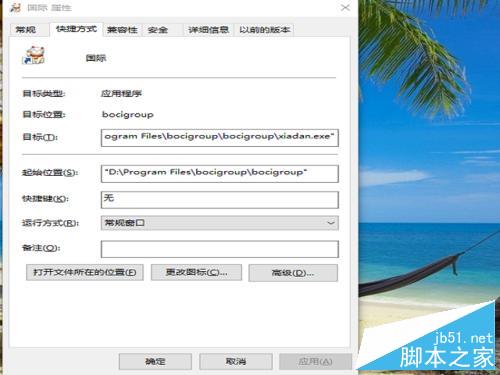
更換步驟

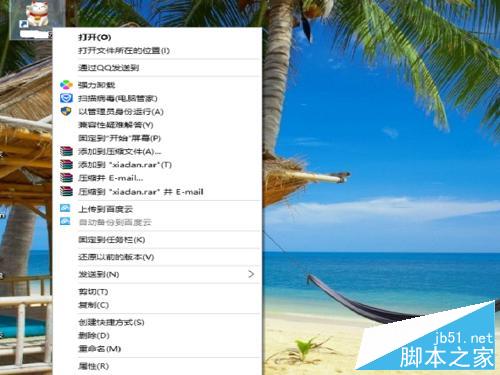
  1. 右鍵點選桌面捷徑 → 「內容」→ 「捷徑」頁籤 → 「變更圖示」。
    捷徑內容
    變更圖示按鈕
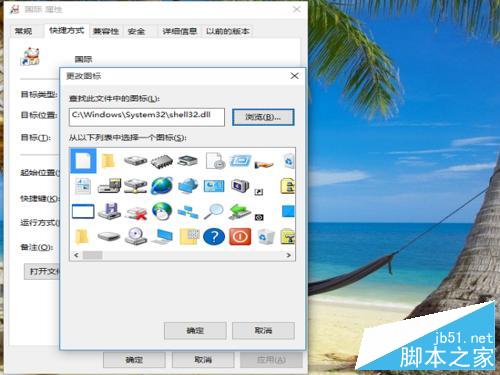
  2. 點選「瀏覽」選取自訂 .ico 檔案,或直接在「尋找此檔案中的圖示」輸入 %SystemRoot%\System32\shell32.dll 使用系統內建圖示庫。
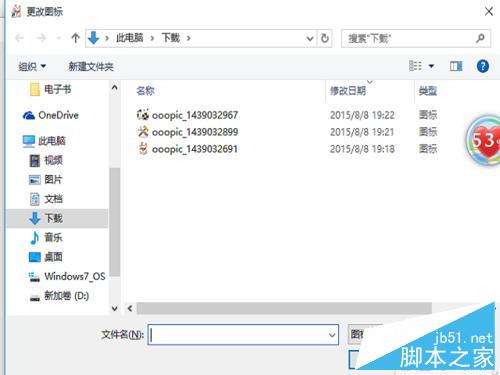
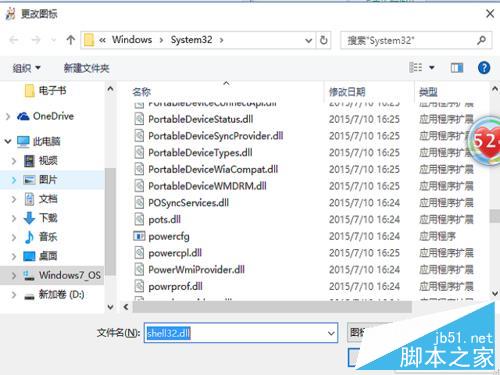
    瀏覽圖示檔
    shell32.dll路徑
  3. 從列表中挑選喜歡的圖示 → 「確定」→ 再次「確定」套用。
    選擇圖示
    套用完成

系統內建 shell32.dll、imageres.dll、ddores.dll 等檔案包含數百款圖示,足以滿足大多數美化需求。若要更換系統原生資料夾/磁碟圖示,需使用第三方工具(如 7TSP、Resource Hacker)修改系統檔案,風險較高,建議僅針對捷徑進行變更。


Copyright © Windows教程網 All Rights Reserved