Windows XP Windows 7 Windows 2003 Windows Vista Windows 綜合教學 Linux 系統教學
Windows 10 Windows 8 Windows 2008 Windows NT Windows Server 電腦軟體教學
您现在的位置: Windows教程網 >> Windows教程 >  >> Windows 綜合教學 >> 關於 Windows

Windows 10 啟用 IIS (Internet Information Services) 架站完整圖文教學

編輯:關於 Windows

想在自己電腦架設 Web 站點,需啟用 IIS。本文詳解 Win10 開啟 IIS 步驟。

步驟如下

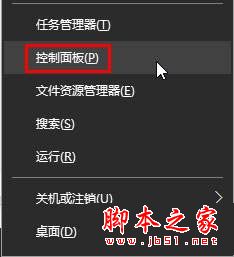
  1. 開始選單右鍵 → 「控制台」
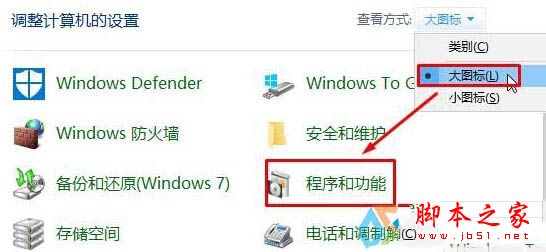
  2. 檢視模式改「大圖示」 → 點擊「程式和功能」
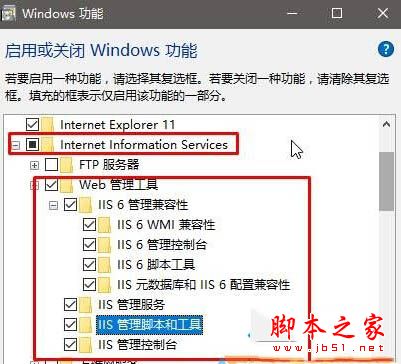
  3. 左側點擊「啟用或關閉 Windows 功能」
  4. 展開 Internet Information Services → Web 管理工具,將所有 iis 開頭選項全勾選 → 確定
  5. 安裝完成依提示重開機
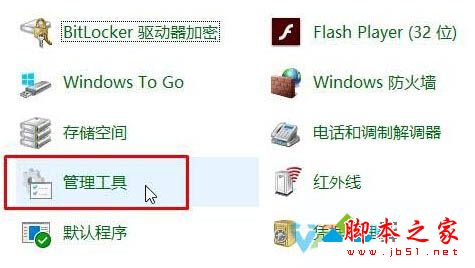
  6. 重開機後再次開啟控制台 → 「系統管理工具」
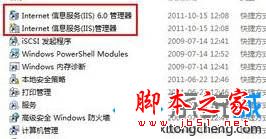
  7. 雙擊「Internet Information Services (IIS) 管理工具」開始設定
以上為 Win10 啟用 IIS 完整教學,需要的朋友快來參考!

Copyright © Windows教程網 All Rights Reserved