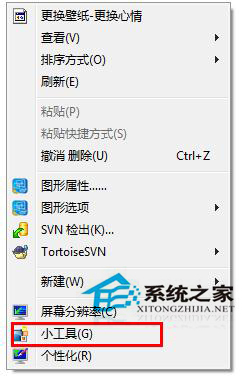
Win7 桌面右鍵選單中「小工具」選項若覺得多餘,可透過登錄移除:
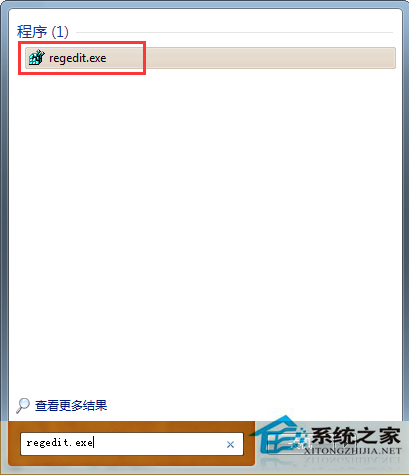
regedit
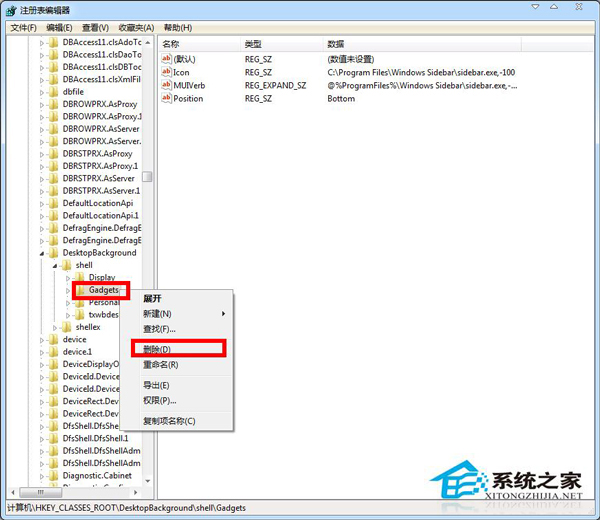
HKEY_CLASSES_ROOT\DesktopBackground\Shell
Shell
Gadgets
同理可刪除 Personalize 移除「個人化」選項。
Personalize
Windows 10 Build 10074 開始選單毛玻璃效果啟用法:登錄修改 EnableBlurBehind=1
Windows 10 正式版釋出時間確認:RTM 6 月交付 OEM,7/29 公開推送免費升級
Windows 10 激活工具下載與一鍵永久激活圖文教程
Win7 區域網路共用檔案提示「登入失敗:使用者帳戶限制」?啟用空白密碼共用原則解決
Win 10 降級 Win 7/8.1 教程:系統回退功能安全方便,一個月內有效
WinXP 右下角提示「延遲寫入失敗」檔案可能損毀?四大成因與對策
Win8 啟用隱藏 Administrator 帳戶:命令列一鍵啟用/停用
Win10 資料夾顯示圖片詳細屬性(解析度、拍攝時間等)完整教學