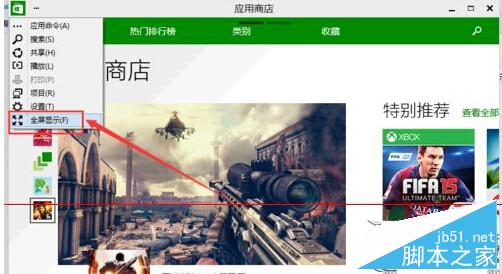
Win10 應用程式商店視窗右上角僅有最大化按鈕,若要進入真正的全螢幕模式 (隱藏標題列與工作列),需點擊右上角「...」選單選擇「全螢幕顯示」。
全螢幕模式下按 Esc 或滑鼠移至頂端中間呼叫隱藏的標題列可退出。此功能適合平板模式或大螢幕沉浸式瀏覽應用程式。
Win10 如何設定擴展顯示器?筆電雙螢幕設定完整教學
XP 系統無法安裝 .NET Framework 4.0 解決教學 清理軟體發佈資料夾與登錄權限
Windows 10 快速啟動設定:透過登錄優化應用程式啟動速度
Windows Server 2016 全新叢集模式深度解析:工作群組叢集部署實戰
Win 8 如何關閉 Windows 防火牆?改用第三方安全軟體更安心
Win10/Win8.1/Win7 無法識別 USB 裝置?三大解決方案完整攻略
Win7 家庭版、專業版、旗艦版差異比較,六大版本功能一次看懂
Windows Server 2008 R2 設定同一管理員多 IP 遠端桌面並行登入