Windows XP Windows 7 Windows 2003 Windows Vista Windows 綜合教學 Linux 系統教學
Windows 10 Windows 8 Windows 2008 Windows NT Windows Server 電腦軟體教學
您现在的位置: Windows教程網 >> Windows教程 >  >> Windows 綜合教學 >> 關於 Windows

XP 系統無法安裝 .NET Framework 4.0 解決教學 清理軟體發佈資料夾與登錄權限

編輯:關於 Windows

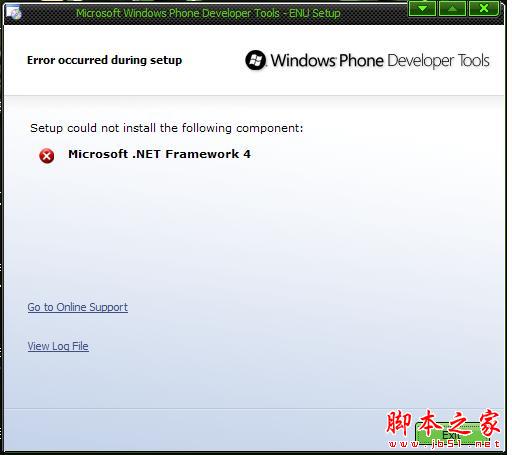
錯誤現象

安裝 .NET Framework 4.0 失敗,提示錯誤視窗。
三步驟解決

步驟一:重置 Windows Update 元件

  1. Win+R → cmd → 執行 net stop WuAuServ
  2. Win+R → %windir% → 將 SoftwareDistribution 資料夾重命名為 SDold
  3. Win+R → cmd → 執行 net start WuAuServ

步驟二:修正 IE 登錄權限(Ghost 系統常見問題)

  1. Win+R → regedit
  2. 瀏覽至 HKEY_LOCAL_MACHINE\SOFTWARE\Microsoft\Internet Explorer\Main
  3. 右鍵 Main → 「權限」 → 目前使用者勾選「完全控制」。

步驟三:重新安裝 .NET Framework 4.0

完成上述步驟後,再次執行安裝程式通常即可成功。

原理說明

Ghost 版系統常修改 IE 相關登錄導致權限不足,且 Windows Update 快取損壞會阻礙 .NET 安裝。清理快取與修正權限可解決 90% 以上案例。

Copyright © Windows教程網 All Rights Reserved