Windows XP Windows 7 Windows 2003 Windows Vista Windows 綜合教學 Linux 系統教學
Windows 10 Windows 8 Windows 2008 Windows NT Windows Server 電腦軟體教學
您现在的位置: Windows教程網 >> Windows教程 >  >> Windows 綜合教學 >> 關於 Windows

Win8 如何修改 C 槽磁碟機代號名稱?登錄編輯自訂磁碟標籤教學

編輯:關於 Windows

Windows 8 預設 C 槽標籤為「Windows8」或空白,透過登錄編輯器新增 DriveIcons 鍵值可自訂任意磁碟機顯示名稱,方便多磁碟環境識別。

修改步驟

  1. 按 Win + R 輸入 regedit 開啟登錄編輯器。
  2. 搜尋或導覽至 HKEY_LOCAL_MACHINE\SOFTWARE\Microsoft\Windows\CurrentVersion\Explorer\DriveIcons (若無則手動建立)。
  3. 在 DriveIcons 下新增項目 (Key) 命名為 C。
  4. 在 C 下再新增項目命名為 DefaultLabel。
  5. 雙擊 DefaultLabel 右側的「預設」字串值,數值資料輸入想要的名稱 (如「系統碟」、「工作碟」等),確定。
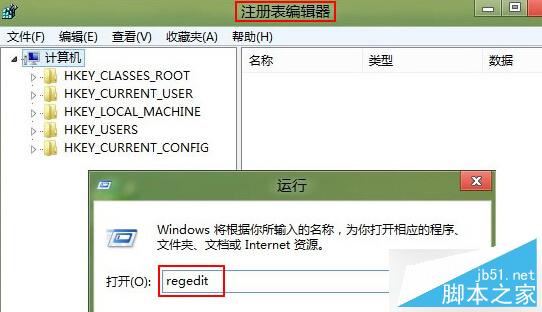
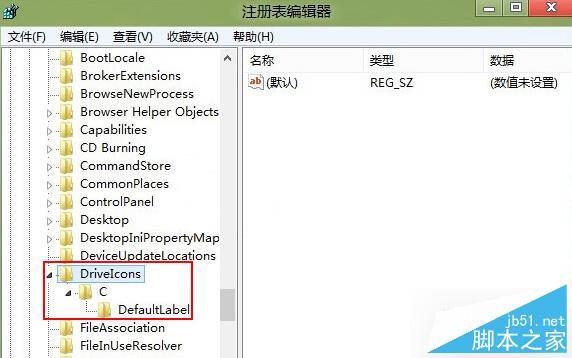
  6. 重新開機或重新啟動 explorer.exe 生效。

執行 regedit
DriveIcons 登錄結構

同樣方法可修改 D、E 等其他磁碟機標籤,只需將項目名稱改為對應磁碟代號即可。

Copyright © Windows教程網 All Rights Reserved