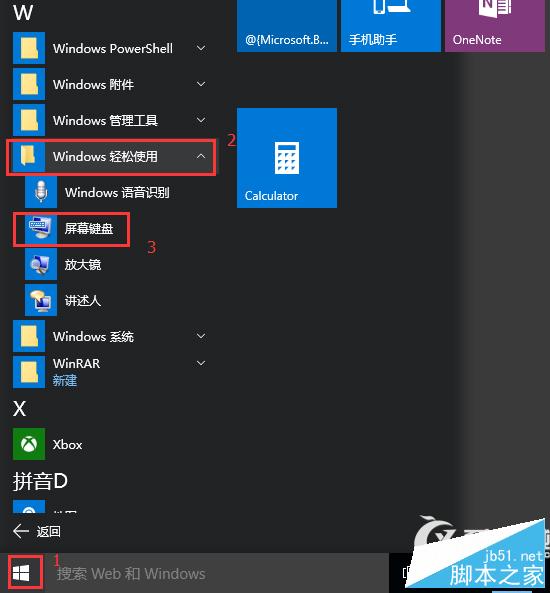
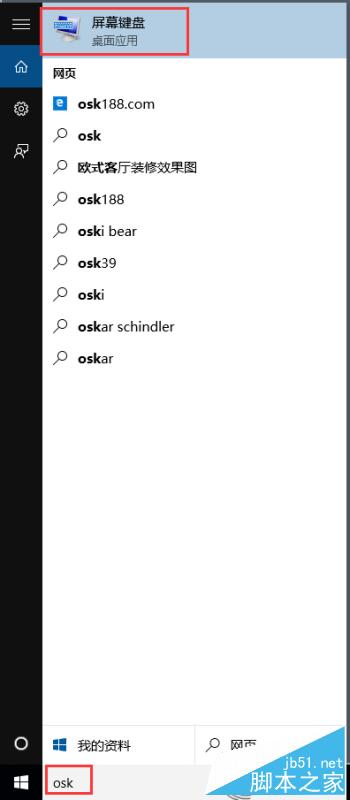
Windows 10 內建螢幕鍵盤 (On-Screen Keyboard, OSK) 方便觸控裝置或鍵盤故障時使用,提供兩種最快啟動管道。
OSK
螢幕鍵盤支援滑鼠點擊、觸控輸入,並可在選項中調整按鍵音效、預測文字等設定。
Win7 EXE 圖示不見了?一鍵批次檔修復圖示快取
Windows 10 重塑應用模型:禁止隱藏啟動、強制啟動,打造純淨桌面環境
Win7 找不到「網路芳鄰」?其實已改名為「網路」— 三種快速找法
Win7 利用 netstat 指令偵測木馬連線並結束惡意進程
Windows 8 切換投影/第二螢幕模式:Win+P 與裝置 Charms 兩種叫法
Windows 10 Edge 瀏覽器修改預設下載位置三種方法
Windows 8 控制台找不到 BitLocker:版本限制與服務檢查雙重排查
Win10 如何解壓縮檔案?必須安裝第三方工具(WinRAR / 7-Zip / 360壓縮等)