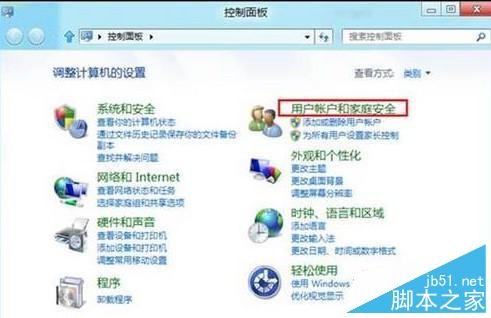
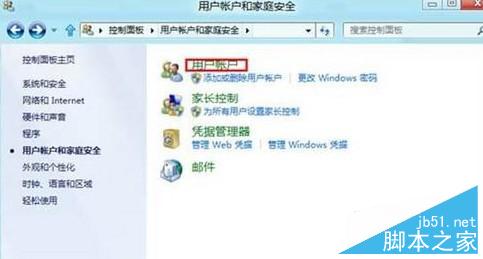
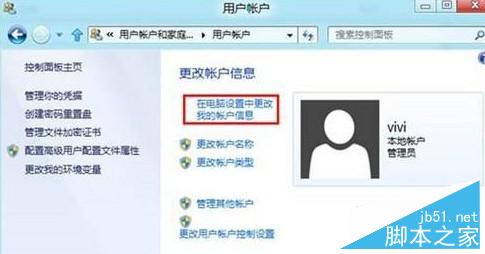
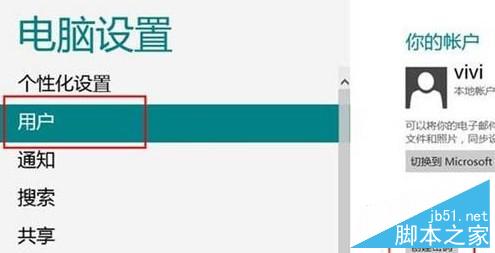
Win8 設定帳號密碼:
簡單六步驟保護帳戶安全,操作直觀易懂。
Windows 7 無法啟動 Power 服務提示「錯誤 2:系統找不到指定檔案」?匯入註冊表修復服務設定
網頁版 Windows 93 正式發布:非微軟出品,內建遊戲與虛擬機體驗
Win10 通知中心(行動中心)完整指南:開啟方式、快速動作功能與關閉技巧
Win10 首次提供免費升級!七大新變革一覽:多平台同步、Cortana、Spartan、Xbox 整合
Win8 開始畫面找不到「附屬應用程式」?三步驟快速開啟計算機、記事本等傳統工具
解決殺毒後 Windows 桌面消失:explorer.exe 恢復完整指南
Windows 上安裝 Ulipad Python IDE 完整圖文教學
Win10 如何登入 Microsoft 帳戶?從註冊到切換帳戶類型完整圖文教學