Windows XP Windows 7 Windows 2003 Windows Vista Windows 綜合教學 Linux 系統教學
Windows 10 Windows 8 Windows 2008 Windows NT Windows Server 電腦軟體教學
您现在的位置: Windows教程網 >> Windows教程 >  >> Windows 綜合教學 >> 關於 Windows

Windows 上安裝 Ulipad Python IDE 完整圖文教學

編輯:關於 Windows

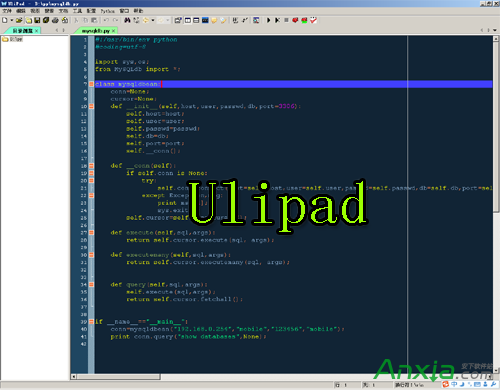
Ulipad 是一款國產輕量級 Python 整合開發環境 (IDE),由 limodou 開發,本身以 Python + wxPython 撰寫,介面簡潔、功能完整,非常適合 Python 初學者入門使用。本文將詳細說明在 Windows 平台上安裝與設定 Ulipad 的完整步驟。

軟體下載與版本說明

  • Python: 建議下載 python-2.7.2.msi (32 位元版本)。
  • Ulipad: 從 官方下載頁 取得壓縮包版本。
  • wxPython: 對應 Python 2.7 版本,下載 wxPython2.8-win32-unicode-2.8.12.1-py27.exe。
  • comtypes: 下載 comtypes-0.6.2.win32.exe。

安裝步驟

  1. 安裝 Python: 執行 python-2.7.2.msi,建議安裝路徑設為 D:\Python。
    Ulipad 介面
  2. 部署 Ulipad: 將下載的 Ulipad 壓縮包解壓縮至任意資料夾,例如 D:\Ulipad。
  3. 安裝 wxPython: 執行 wxPython2.8-win32-unicode-2.8.12.1-py27.exe,安裝過程會自動偵測 Python 路徑。
  4. 安裝 comtypes: 執行 comtypes-0.6.2.win32.exe 完成安裝。
  5. 啟動 Ulipad: 進入 Ulipad 目錄,雙擊 UliPad.pyw 即可啟動編輯器。

環境設定:指定 Python 解譯器

  1. 開啟 Ulipad,依序點選選單列:編輯 → 參數 → Python → 設定 Python 解譯器 → 增加。
  2. 在「解譯器路徑」選擇 Python 安裝資料夾下的 python.exe,描述填入 2.7 console。
  3. 再新增一組,選擇 pythonw.exe,描述填入 2.7 window。
  4. 點擊確定完成設定。

完成上述步驟後,Ulipad 即可正常運作。您可以開始編寫、執行與偵錯 Python 程式碼。這套工具鏈雖然基於 Python 2.7,但對於學習基礎語法與邏輯仍是極佳的選擇。

Copyright © Windows教程網 All Rights Reserved