2015 年 9 月累積更新 KB3081455 推出後,大量用戶回報安裝失敗,錯誤代碼 0x80070002(系統找不到指定檔案)。微軟官方暫未承認此問題,但社群驗證 sfc /scannow 可有效修復。
0x80070002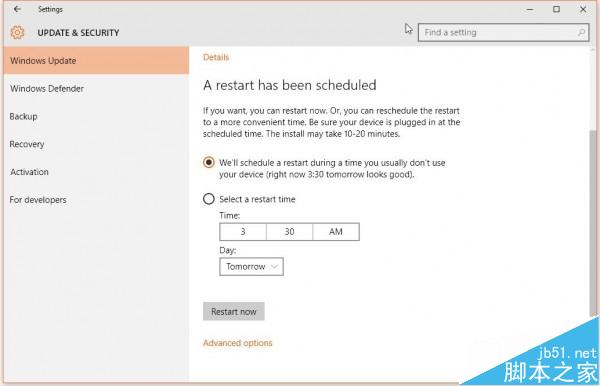
sfc /scannow 按 Enter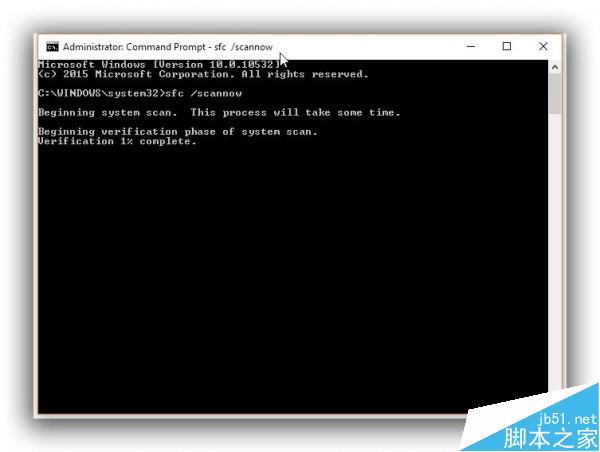
0x80070002 通常代表更新所需的系統檔案遺失或損毀sfc /scannow 會對比 Windows 元件存放區修復受損檔案DISM /Online /Cleanup-Image /RestoreHealth 修復元件存放區一條 sfc /scannow,解決多數 KB3081455 安裝卡關。
Win10 桌面圖示變黑塊或消失三大解決法:SFC 掃描、重建圖示快取、新建使用者
Win10 激活問題全攻略:四步搞定數字授權、產品密鑰、清潔安裝、電話激活
Win10 Insider 計畫:Fast Ring 使用者僅佔 Slow Ring 十分之一,團隊預期分佈
Win10 Build 986x 變革:Charms 欄網路功能改為獨立視窗,提供更多 Wi-Fi 選項、熱點列表與 VPN 控制
Win7 字體模糊解決:ClearType 文字微調 4 步驟找回銳利字型
Windows 10 取消每週磁碟碎片整理排程:SSD 用戶必關閉,HDD 視需求手動執行