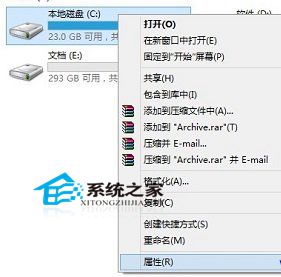
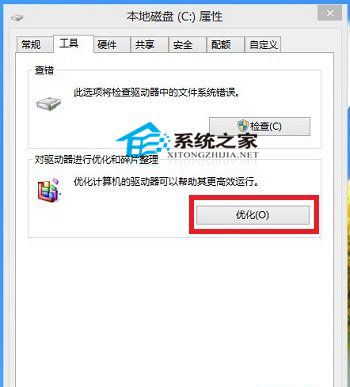
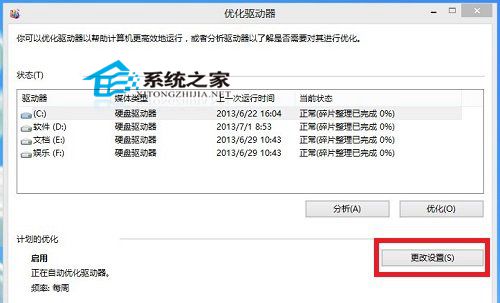
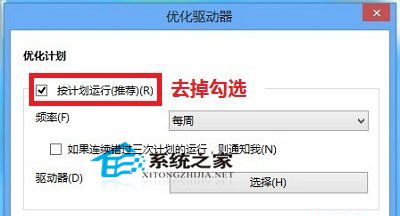
Windows 預設每週自動執行磁碟碎片整理,對現代 SSD 不僅無益反而縮短壽命,HDD 也不需如此頻繁。本文教您關閉排程,改為有需要時手動執行。
重要:SSD 絕對不需碎片整理 (TRIM 機制自動優化);HDD 建議每月手動執行一次即可。
Windows 8 變更搜尋設定教學:清除歷史紀錄、停用網路搜尋、控制 Bing 資料分享
Win7 設定密碼永不過期 圖文教學 透過本機用戶和群組
Win8 刪除已安裝更新補丁完整教程:釋放磁碟空間、解決更新導致的相容問題
微軟開始推送 Win10 預覽版 10565 至慢速通道
Win10 如何設定自動關機?工作排程器定時關機教學
Win10 10547 登入畫面背景自訂教學
Win10 10547 Insider 改進:切換微軟帳號獲取預覽版 + 暫停接收 1/3/5 天
Windows 7 IE11 無法解除安裝或重裝?強制移除並重新安裝教學