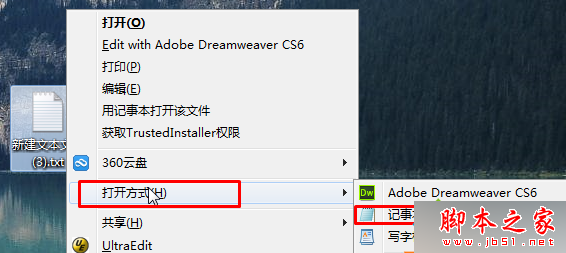
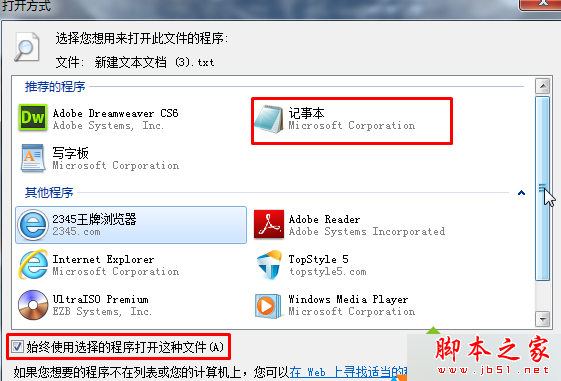
Win7 純淨版雙擊 .txt 檔無法開啟,通常是檔案關聯錯誤。重新關聯至記事本即可修復:
C:\Windows\system32\notepad.exe
若仍無效,可能記事本程式損壞,可從其他電腦複製 notepad.exe 覆蓋或重裝系統解決。
notepad.exe
Win7 安裝金山毒霸提示「安裝引擎失敗,不支援此介面」解決方案:衝突源為 ACDSee 迷你版
Win10 內建「備註」功能管理照片/影片?新增備註與檔案總管顯示欄位教學
Win8 應用商店搜尋功能在哪?Win+C / Win+F 兩種喚出法
Windows 10 移除內建應用程式完整指南:PowerShell 單指令批次卸載郵件、Xbox、OneNote 等預裝 App
Windows 7 停用檔案總管搜尋方塊歷史記錄教學
Windows 10 寬帶連線錯誤 813 根治方案:關機批次檔自動斷線再關機
WinXP 設定寬帶重撥間隔:網路連線→寬帶連線屬性→選項→重撥間隔自訂秒數
如何從微軟官網下載 Win10 預覽版簡體中文版?