檔案總管搜尋方塊會自動記錄搜尋歷史,若不想保留隱私,可透過群組原則停用此功能。
gpedit.msc 開啟「本機群組原則編輯器」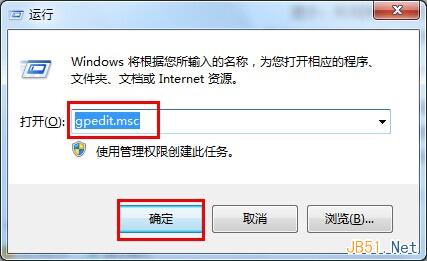
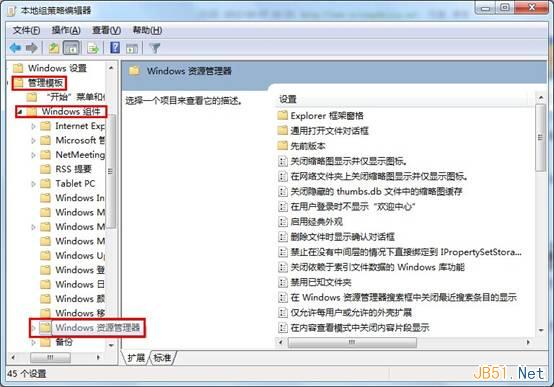
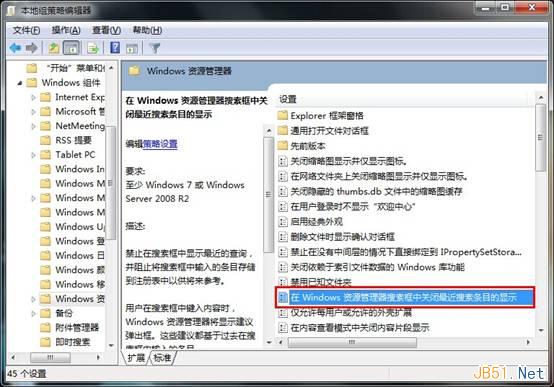
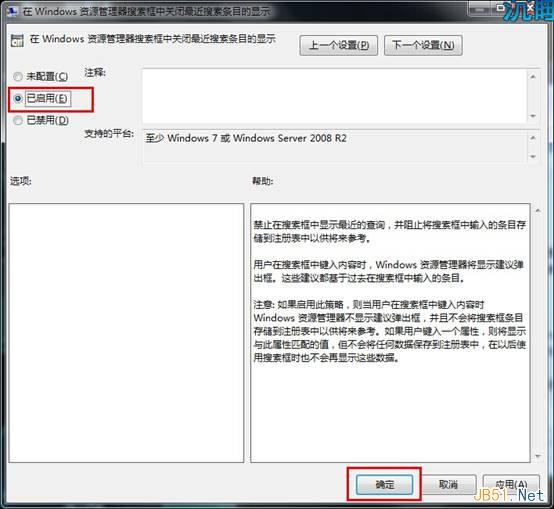
設定完成後,搜尋方塊將不再顯示歷史記錄,保護隱私。
Win7 IE 瀏覽器管理增益集:啟用、停用、移除工具列與搜尋提供者完整圖解
Windows 7 善用 slmgr 指令保護產品金鑰:從登錄移除防止惡意提取
Windows 10 隱私爭議:即使關閉所有追蹤開關,仍定期與微軟伺服器通訊傳輸遙測資料
Win10 如何查詢 DNS 位址?CMD 指令與網路介面卡詳細資料兩種方法完整教學
Win10 15014 Spectrum 服務異常導致音訊消失、Edge 無回應:刪除 PersistedSpatialAnchors 資料夾修復
Win8.1 Update 更新失敗(錯誤 80070020/80073712/0x800f081f)?DISM 兩指令修復教學