Windows XP Windows 7 Windows 2003 Windows Vista Windows 綜合教學 Linux 系統教學
Windows 10 Windows 8 Windows 2008 Windows NT Windows Server 電腦軟體教學
您现在的位置: Windows教程網 >> Windows教程 >  >> Windows 綜合教學 >> 關於 Windows

Win10 正式版未收到 10586 (TH2) 更新推送?清除 Windows Update 快取重新檢查解決

編輯:關於 Windows

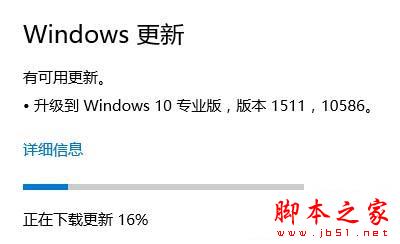
Win10 正式版 (10240) 長時間未收到 10586 (TH2) 大版本更新推送,通常為 Windows Update 快取損毀或元件存儲異常。以下為重置快取步驟:

解決步驟

  1. Win+R → services.msc → 找到 Windows Update → 右鍵「停止」。
  2. 開啟檔案總管前往 C:\Windows\SoftwareDistribution → 刪除 DataStore 與 Download 兩個資料夾 (或僅清空內容)。
  3. 回 services.msc → 找到 Windows Update → 右鍵「啟動」。
  4. 重新開機。
  5. 開機後進入「設定」→「更新與安全性」→「Windows Update」→ 「檢查更新」,即可收到 10586 更新推送。

補充說明

  • 此法適用於所有 Windows Update 卡住、錯誤碼 0x8007xxxx、0x8024xxxx 等情況。
  • 若仍無法更新,可嘗試執行 Dism /Online /Cleanup-Image /RestoreHealth 修復元件存儲,再重複上述步驟。

  • 企業版/教育版若透過 WSUS/SCCM 管理,請聯繫 IT 部門確認更新部署狀態。

TH2 更新

Copyright © Windows教程網 All Rights Reserved