精簡版/ Ghost XP 系統安裝後,執行 Win+R → clipbrd 提示找不到檔案,剪貼板檢視器未安裝。
clipbrd 測試,若無法啟動則需安裝元件。I386 來源路徑),完成安裝。clipbrd,剪貼板檢視器正常開啟。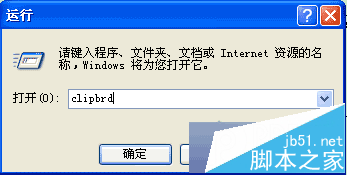
剪貼板檢視器 (clipbrd.exe) 為 XP 選用元件,精簡版常被移除。透過 Windows 元件精靈按需安裝即可恢復功能。
UWP 應用整合 Cortana 完整指南:三種語音交互模式與設計準則
Win7 開啟瀏覽器藍屏 1000008E?罪魁禍首是 360 驅動 qutmdrv.sys,三招徹底解決
Win7 右下角提示「此 Windows 並非正版」三大解決方案:重新授權、啟用服務、永久啟用金鑰
Win10 如何加快開機與關機速度?msconfig 與登錄檔優化
Windows 10 Mobile 10586.29 更新:可安裝 WP7 時代經典遊戲(Orbital、Fable Coin Golf 等)
Win10 周年更新 Windows Hello 生物識別全解析:臉部/指紋/配對裝置免密登入