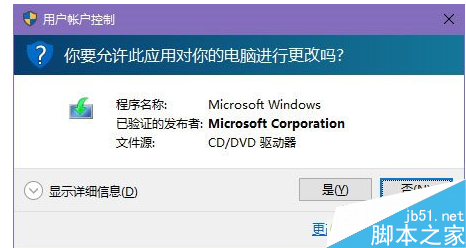
多用戶回報 Win10 透過 Windows Update 推送 Realtek HD Audio 驅動安裝失敗無錯誤碼,關閉 UAC 使用者帳戶控制後即可正常安裝,推測安裝過程需提權卻未正常彈出 UAC 提示。
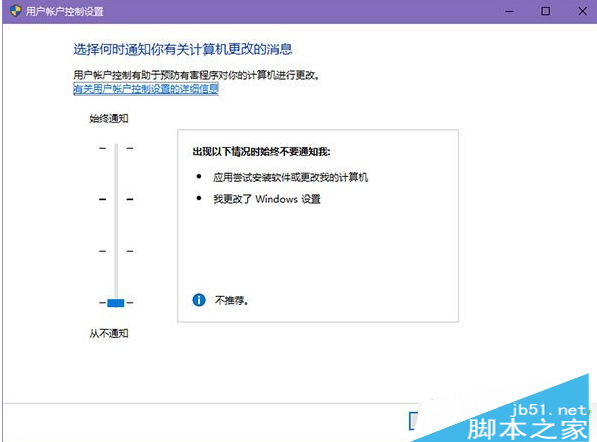
工作列搜尋 UAC → 開啟設定 → 滑桿拉至最低「從不通知」
UAC
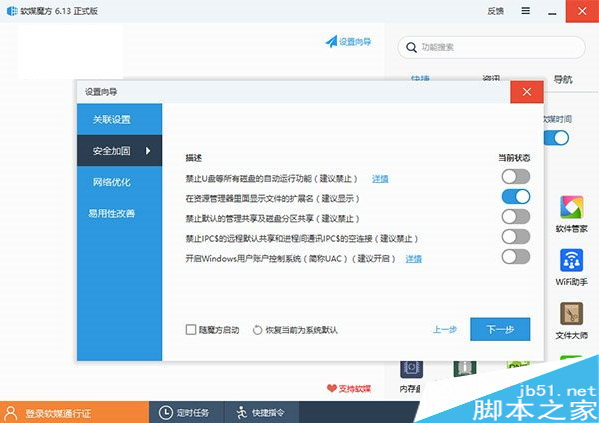
軟媒魔方用戶:主視窗 → 「設定嚮導」 → 「安全性加固」 → 關閉 UAC
建議: 解決後重新開啟 UAC 保護系統安全。
Win10 無法安裝 Visual Studio 2015?安裝順序與環境衝突解析
Win8.1 修改輸入法顯示順序:系統級+搜狗雙層級調整教程
Windows Phone 8 音樂播放器常見七大痛點與終極解決方案
Windows 開機報 BOOT\BCD 錯誤?安裝媒體一鍵修復 bcdboot 指令教學
Win10 Mobile 10080 預覽版:Edge 與 IE11 瀏覽器 HTML5 跑分對比
Windows 7 停用多餘啟動項加速開機完整指南
Win10 怎麼下載軟體?瀏覽器下載 + 應用程式商店雙管道教學
如何安裝 Windows 8 系統:圖文安裝教學完整流程