許多用戶升級 Win10 後發現預覽版 Office 應用程式無法啟動或頻繁當機。一般卸載重裝對傳統版 Office 有效,但對觸控版(UWP)Office 則失效,主因在於 Windows Store 授權服務的快取未隨卸載清除。本文提供批次檔腳本,徹底清除授權快取並重新安裝,解決無法開啟、閃退等問題。
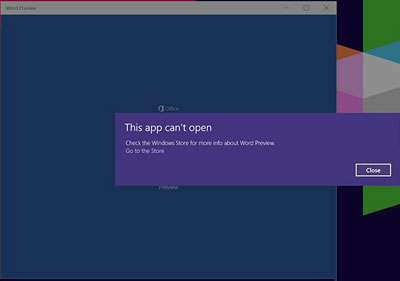
Win10 版 Office 無法開啟怎麼辦
@echo off
net stop clipsvc
if "%1"=="" (
    echo ==== BACKING UP LOCAL LICENSES
    move %windir%\serviceprofiles\localservice\appdata\local\microsoft\clipsvc\tokens.dat %windir%\serviceprofiles\localservice\appdata\local\microsoft\clipsvc\tokens.bak
)
if "%1"=="recover" (
    echo ==== RECOVERING LICENSES FROM BACKUP
    copy %windir%\serviceprofiles\localservice\appdata\local\microsoft\clipsvc\tokens.bak %windir%\serviceprofiles\localservice\appdata\local\microsoft\clipsvc\tokens.dat
)
net start clipsvc
license.bat(儲存類型選「所有檔案」)。完成上述步驟後,Office 預覽版應能正常啟動。此法同樣適用於其他 UWP 應用授權異常的情況。