升級 Win10 後不適應可降級回原系統(Win7/8.1),條件與步驟:
前置條件
- 升級後 30 天內(舊版本檔案會自動清除)。
- 系統盤存在
Windows.old 資料夾(含舊系統關鍵檔案)。
- 重要資料已備份(降級過程極少遺失,但建議雙重保險)。
降級步驟
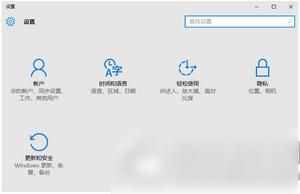
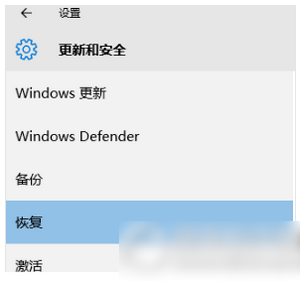
- 「開始」→「設定」→「更新與安全性」→ 左側「復原」。
- 「回到之前的 Windows 版本」→ 「開始」。
- 選擇降級原因(不影響流程)→ 選擇保留檔案類型 → 最後確認 → 「確認」。
- 等待降級完成(需時約同升級),重開機進入舊系統。
注意:只能降回升級前的原系統版本(Win7 降 Win7、Win8.1 降 Win8.1),不可跨版本選擇。若超過 30 天或刪除 Windows.old,唯有重新安裝舊系統。