Windows XP 使用 IE 瀏覽淘寶時只顯示文字不顯示圖片,地址列無異常。主因為 IE 快取過多或「顯示圖片」選項被取消。提供批次檔清理快取與 IE 設定兩種方案。
@echo off
echo 正在清除系統垃圾檔案,請稍候......
del /f /s /q %systemdrive%\*.tmp
del /f /s /q %systemdrive%\*._mp
del /f /s /q %systemdrive%\*.log
del /f /s /q %systemdrive%\*.gid
del /f /s /q %systemdrive%\*.chk
del /f /s /q %systemdrive%\*.old
del /f /s /q %systemdrive%\recycled\*.*
del /f /s /q %windir%\*.bak
del /f /s /q %windir%\prefetch\*.*
rd /s /q %windir%\temp & md %windir%\temp
del /f /q %userprofile%\cookies\*.*
del /f /q %userprofile%\recent\*.*
del /f /s /q "%userprofile%\Local Settings\Temporary Internet Files\*.*"
del /f /s /q "%userprofile%\Local Settings\Temp\*.*"
del /f /s /q "%userprofile%\recent\*.*"
echo 清除完成!
pause
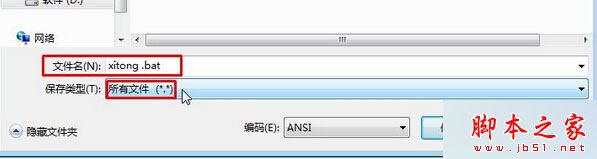
xitong.bat → 存放桌面。xitong.bat 等待完成,重新開啟淘寶測試。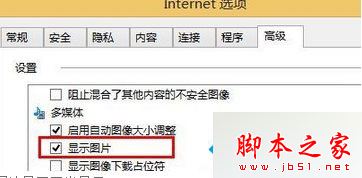
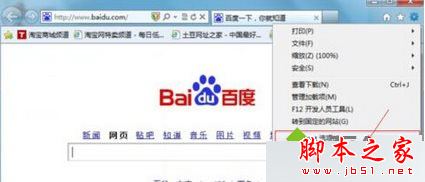
兩方案結合使用,基本可解決 XP 下淘寶不顯示圖片問題。
Win10 家庭版終於可關閉商店應用程式自動更新!KB3081448 更新後開關解鎖
WinXP 設定 Caps Lock 鍵關閉大寫鎖定,告別誤觸輸入錯誤
Windows 8.1 撥號錯誤 651 解決方案:啟動腳本自動撥號繞過 Modem 相容性問題
Windows 10 更新 KB3124200 導致 Office 2016 Word 設定遺失 (Normal.dotm 被重命名) 的官方修復方法
Win7 提示「系統資源不足」四大通用解法:禁用啟動項、加大虛擬記憶體、預留硬碟空間、用記憶體管理工具