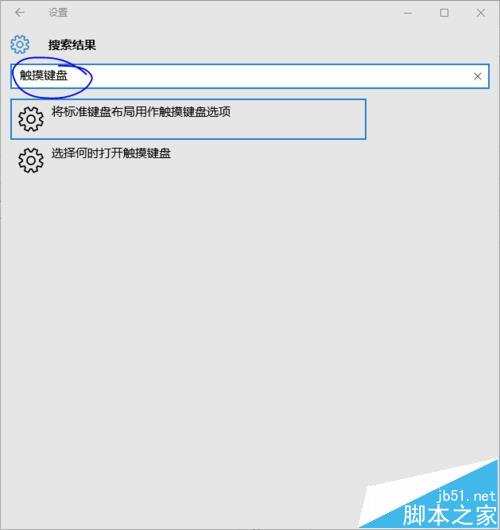
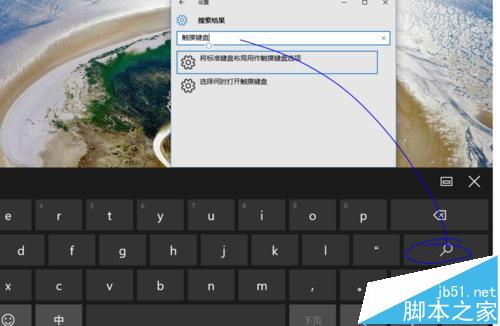
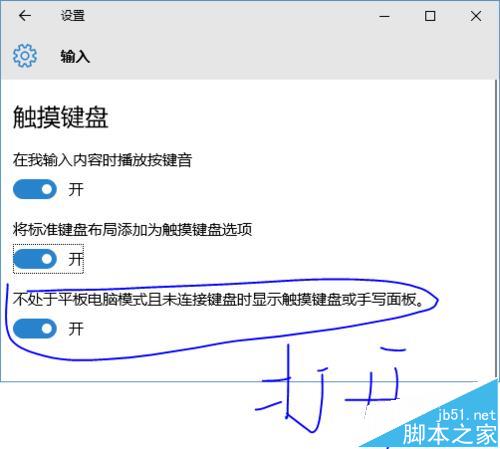
Win10 新版預設僅在平板模式自動彈出觸控鍵盤,一般筆電/觸控螢電腦若想在桌面模式也能自動喚醒,需在設定中啟用對應選項。
此設定對 2-in-1 裝置、觸控筆電尤為實用,免去手動點擊鍵盤圖示的麻煩。
Win10 右鍵無「新增」選項?登錄檔修復 ContextMenuHandlers\New
Windows Server 2003 建立永久隱藏帳號教學
Win7 硬碟壞軌/檔案系統錯誤怎麼修?自動掃描修復與手動指令完整教學
Win10 免工具加密資料夾:EFS 檔案系統加密完整教學與憑證備份
Windows 10 查看電腦配置教學:dxdiag 指令與「這台電腦」內容兩大法判斷遊戲/軟體相容性
Win10 Mobile 10166 已知問題修復彙總:穩定性大幅提升
Win7/8.1 未收到 Win10 推送別急:微軟分批推送,$Windows.~BT 資料夾大小判斷下載進度
Windows 10查看MAC地址兩大法:圖形介面與命令列完整教學